

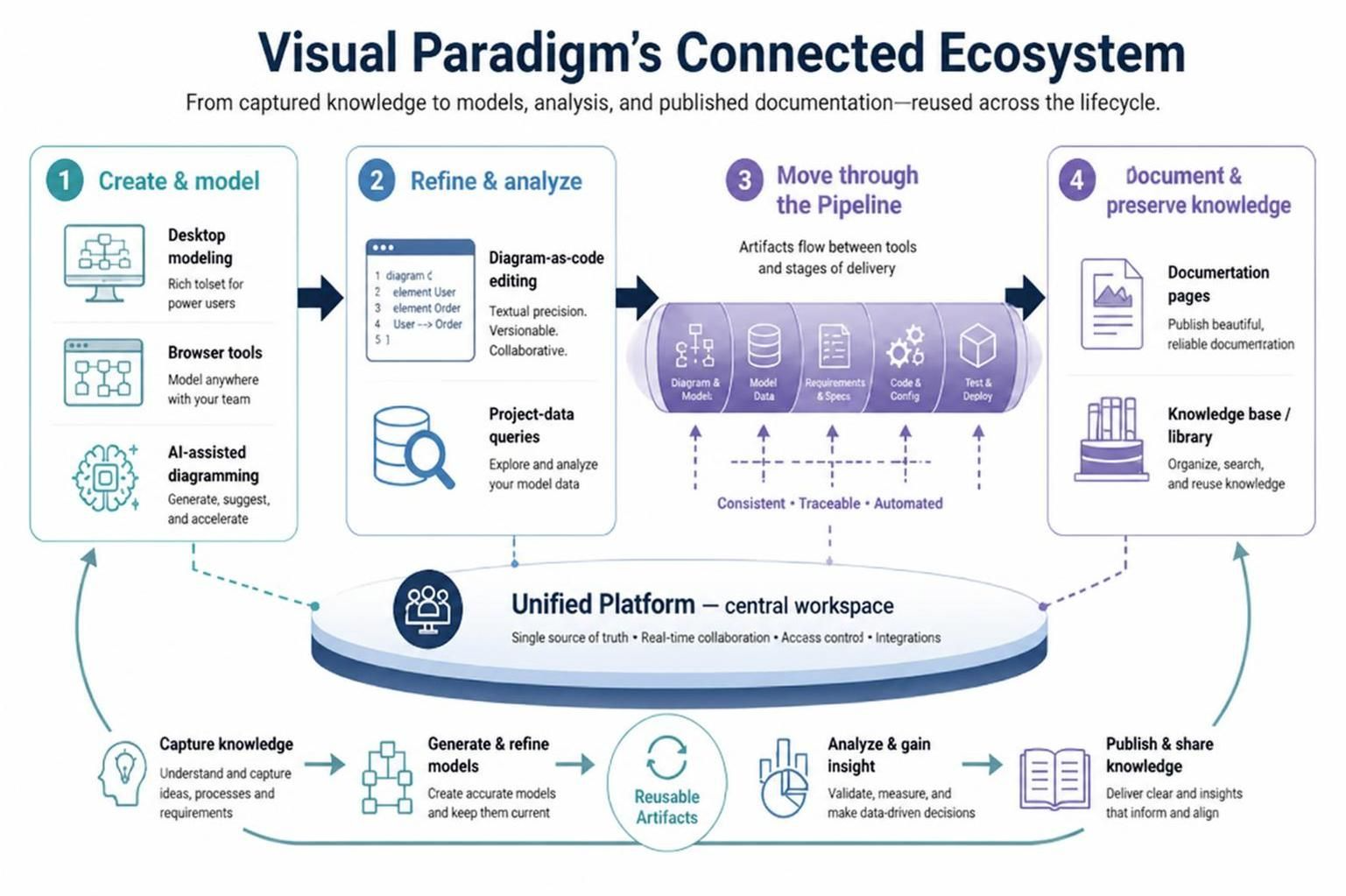
Visual Paradigm has evolved from a standalone diagramming tool into a comprehensive, integrated ecosystem designed to manage the entire software development lifecycle. The core philosophy behind this platform is not just about drawing diagrams, but about connecting disparate activities into a fluid workflow. By treating the platform as a Unified Platform and utilizing a Pipeline architecture, users can seamlessly transition from initial brainstorming to final, automated documentation.
1. The Unified Platform: A Central Workspace
At the heart of the Visual Paradigm ecosystem lies the Unified Platform. Unlike traditional tools where models are saved as isolated files, this platform acts as a centralized workspace. It provides a “single source of truth” for all project artifacts.
- Real-time Collaboration: Teams can work on models simultaneously without version conflicts.
- Access Control: Centralized management ensures that sensitive project data is secure.
- Integrations: The platform serves as a hub that connects with various external tools and internal modules.
2. Phase I: Create and Model
The journey begins with the Create & Model phase. This stage is characterized by flexibility, offering three distinct entry points depending on the user’s needs and the stage of the project.
Desktop Modeling
For power users requiring deep functionality, the desktop application offers a rich toolset. It is ideal for complex architectural modeling where offline performance and advanced feature sets are critical.
Browser-based Tools
For agility and teamwork, browser-based tools allow users to model anywhere. This is particularly useful for quick prototyping or when collaborating with stakeholders who may not have the desktop software installed.
AI-Assisted Diagramming
Leveraging modern AI capabilities, this feature allows users to generate and accelerate their modeling process. The AI can suggest structures, generate diagrams from text prompts, and help refine initial concepts, significantly reducing the time spent on manual drawing.
3. Phase II: Refine and Analyze
Once a model is created, it must be refined and analyzed. This phase introduces powerful text-based and data-driven capabilities.
Diagram-as-Code Editing
For users who prefer precision and version control, Diagram-as-Code allows you to edit models using text syntax. This approach offers:
- Textual Precision: Exact control over element positioning and properties.
- Versionability: Models can be stored in Git repositories and diffed like standard code.
- Collaboration: Multiple developers can work on the same model structure via pull requests.
Project-Data Queries
Beyond simple visualization, the ecosystem allows you to query the underlying data of your models. Using query languages, you can extract specific information, validate constraints, and analyze relationships across different diagrams to ensure consistency.
4. Phase III: Move Through the Pipeline
The “Pipeline” is the connective tissue of the ecosystem. It is not merely a storage location but an automated flow mechanism that moves artifacts between tools and stages of delivery. The pipeline ensures that changes are Consistent, Traceable, and Automated.
The pipeline processes various artifact types, including:
- Diagram & Models: The visual representations of the system.
- Model Data: The raw data defining the system components.
- Requirements & Specs: The documentation and standards.
- Code & Config: The generated source code and configuration files.
- Test & Deploy: The final outputs ready for production environments.
5. Phase IV: Document and Preserve Knowledge
The final stage of the workflow is the output phase. The goal is to generate high-quality documentation and preserve the project knowledge for future reference.
Documentation Pages
The system can automatically generate beautiful, reliable documentation pages. Instead of manually copying screenshots, the platform pulls the latest model data to create up-to-date technical specifications and design documents.
Knowledge Base / Library
To ensure longevity, artifacts are stored in a knowledge base or library. This allows teams to organize, search, and reuse knowledge across different projects. It transforms individual project data into institutional memory.
Summary: The Mental Model
To effectively utilize Visual Paradigm, adopt this mental model of the workflow:
- Create & Model: Use desktop, browser, or AI tools to capture ideas.
- Refine & Analyze: Use diagram-as-code and data queries to ensure accuracy.
- Pipeline: Let the pipeline automate the flow of artifacts.
- Document & Preserve: Publish results and store knowledge for the long term.
By following this structured approach, organizations can ensure that their modeling efforts are not just static drawings, but dynamic assets that drive development and documentation.