



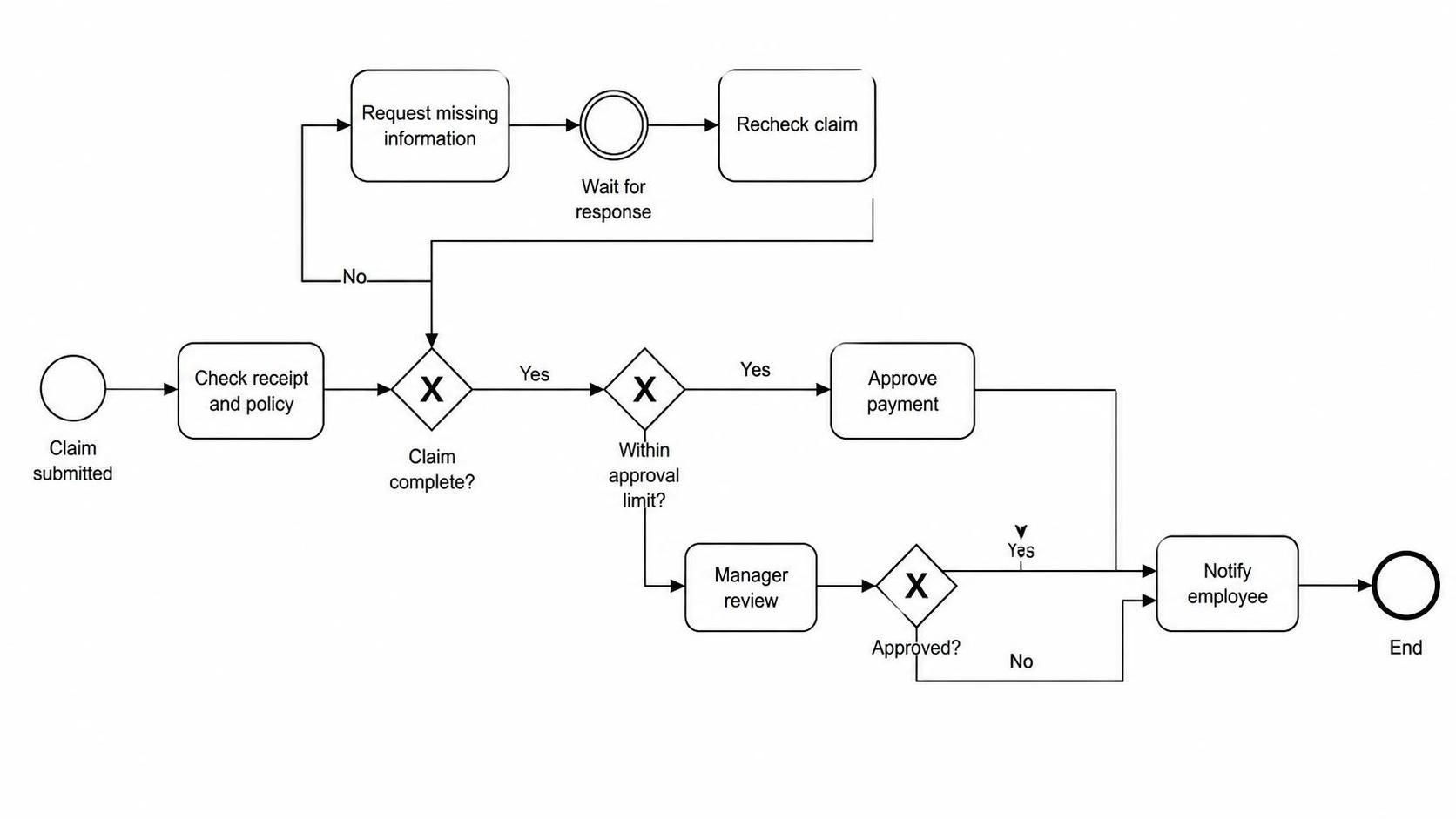
Welcome to this comprehensive tutorial on modeling business processes using Business Process Model and Notation (BPMN). In the financial domain, accuracy and compliance are paramount. The diagram provided illustrates a robust Expense Reimbursement Process, designed to handle complex decision trees, exception handling, and hierarchical approvals.
By utilizing Visual Paradigm (VP) in conjunction with AI-assisted modeling, we can visualize how a simple claim submission transforms into a structured workflow involving policy checks, missing data loops, and managerial gateways.
1. The Core Architecture of the Workflow
The process begins with an Event—specifically, the submission of a claim. In BPMN, this is represented by a thin circle. The flow then moves through a series of activities and gateways designed to validate the financial request.
Starting the Journey: Submission and Validation
The process initiates with the Claim submitted event. Immediately, the system or administrator must perform a critical validation task: Check receipt and policy. This activity ensures that the documentation is valid before any further processing occurs.
First Decision Point: Completeness Gateway
Following the policy check, the flow encounters the first Exclusive Gateway (the diamond shape with an “X”). This is a pivotal decision point asking: “Claim complete?”
- The “Yes” Path: If the claim is complete, the process moves forward to the next validation layer.
- The “No” Path (Exception Handling): If the claim is incomplete, the process diverts into an exception loop. The system must Request missing information. Crucially, this involves a Intermediate Catch Event (the circle with a double border), labeled “Wait for response”. This signifies a pause in the process flow, waiting for an external trigger (the employee’s reply) before the loop can close. Once the response is received, the system executes a Recheck claim activity, feeding the data back into the “Claim complete?” gateway to ensure the issue is resolved.
2. Hierarchical Approvals and Financial Controls
Once the claim is deemed complete, it faces a financial gatekeeper. The next Exclusive Gateway asks: “Within approval limit?”. This logic separates routine transactions from those requiring higher-level oversight.
Scenario A: Routine Approval
If the claim amount falls Within approval limit, the workflow takes a direct path to Approve payment. This represents an automated or low-level approval process, minimizing friction for standard expenses.
Scenario B: Manager Review
If the claim exceeds the limit, the “No” path triggers a Manager review. This is a manual task requiring human intervention. The flow then enters a second Exclusive Gateway asking: “Approved?”.
- If Approved: The workflow converges with the routine path at the final notification step.
- If Rejected: The “No” branch loops back to the final notification step, but implicitly, the payment is not processed. (Note: In a fuller model, this might trigger a “Notify Employee of Rejection” task before ending).
3. Convergence and Termination
Regardless of the path taken—whether it was a quick routine approval, a delayed manager review, or a re-submission of missing information—all valid workflows eventually converge at the Notify employee task. This ensures the stakeholder is informed of the outcome.
The process concludes with a Thick Circle representing the End Event. This marks the definitive termination of the specific instance of the process.
4. Technical Modeling with Visual Paradigm
Creating this diagram in Visual Paradigm involves understanding the specific BPMN elements that enforce logic and state. The diagram utilizes:
- Exclusive Gateways (XOR): Used to route the flow based on boolean conditions (Yes/No).
- Catch Intermediate Events: Essential for modeling the “Wait for response” state, allowing the process to remain suspended until an external action occurs.
- Sequence Flows: The arrows connecting these elements define the strict order of operations.
5. Extending the Model
This is a foundational model. To make it production-ready, Visual Paradigm allows for further enrichment:
- Timers: Add a Timer Intermediate Event to the “Wait for response” loop to automatically escalate the claim if the employee does not reply within 48 hours.
- Error Handling: Add a separate path for rejected claims that explicitly notifies the employee that the process has ended, rather than just looping back to a notification step.
- Data Objects: Attach data objects representing the “Claim Form” and “Receipt” to visualize exactly what information is being passed between tasks.
By mastering these patterns, you can build scalable, compliant, and efficient business process models that automate complex financial workflows.