



In the modern ecosystem of software development, the gap between high-level architectural modeling and executable code is often bridged by automated pipelines. Visual Paradigm’s Pipeline feature serves as this essential bridge, allowing architects to maintain a “Single Source of Truth” across various tools. This tutorial explores the workflow of exporting a robust UML Class Diagram from Visual Paradigm Desktop into the VPasCode environment, ensuring your data structures remain consistent and up-to-date.
Understanding the Architecture: The Pipeline Hub
Before diving into the steps, it is crucial to understand the system architecture behind this workflow. The Pipeline acts as a centralized repository within the Visual Paradigm ecosystem. It is not merely a file storage system but a synchronization mechanism that handles artifacts created in Visual Paradigm Desktop, VPasCode, OpenDocs, and other connected tools.
When you work with a UML Class Diagram, you are defining the skeleton of your application. By utilizing the Pipeline, you ensure that:
- Consistency: Changes made in the model are reflected in the code base.
- Collaboration: Developers can access the latest schema without manual file transfers.
- Automation: The transition from “Design” to “Code” is streamlined.
Step-by-Step: Exporting Your Model to the Pipeline
Based on the workflow architecture, here is how you can export your specific banking domain model from Visual Paradigm Desktop to the Pipeline.
1. Review Your Class Diagram
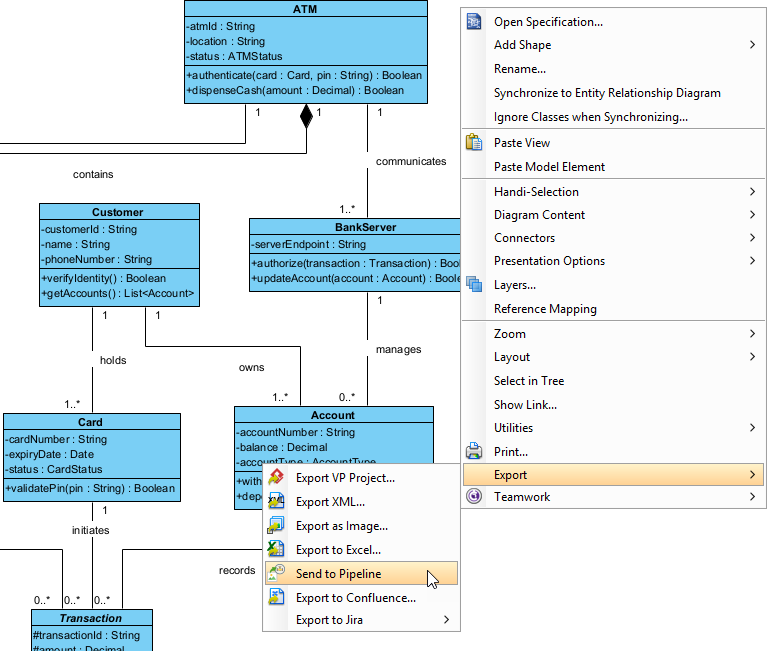
Ensure your UML Class Diagram is complete and validated. In our scenario, we have a robust domain model representing a Banking System. This model includes entities such as ATM, Customer, Card, Account, and BankServer. Verify that all relationships (associations, aggregations) and multiplicities (1, 0.., 1..) are correctly defined.
2. Access the Context Menu
Once your diagram is ready, you need to initiate the export process. In Visual Paradigm Desktop, the most efficient method is via the context menu.
- Right-click anywhere on the empty space of your diagram canvas (or select a specific class element if you wish to export only a portion).
- Navigate through the menu options to find Export.
- Look for the specific option labeled Send to Pipeline.
3. Execute the Export
Clicking Send to Pipeline triggers the upload process. The system packages your diagram artifacts and pushes them to the central Pipeline repository. At this stage, the data is stored centrally, making it available for downstream tools.
The VPasCode Connection
Once the artifacts are in the Pipeline, the workflow transitions to VPasCode. VPasCode acts as the execution layer where this data can be consumed.
- Access VPasCode: Open your VPasCode workspace.
- Retrieve Artifacts: Navigate to the project settings or the Pipeline integration section within VPasCode.
- Synchronize: Select the project or artifact you just exported from Visual Paradigm Desktop.
- Code Generation: The system will parse the UML Class definitions (attributes, methods, and types) and generate the corresponding code skeletons (e.g., Java, C#, or Python classes).
Key Modeling Concepts in Your Diagram
Let’s analyze the specific modeling patterns visible in the diagram to understand how they translate into code:
Aggregation vs. Composition
The relationship between ATM and Card is depicted as an aggregation (indicated by the hollow diamond). This implies a “has-a” relationship where the Card can exist independently of the ATM, but the ATM uses it. In code, this often translates to a reference or a property injection rather than a strict lifecycle dependency.
Association and Multiplicity
The relationship between Customer and Account is marked with multiplicities 1 and 1..*. This means one Customer owns at least one, and potentially many, Accounts. In the generated code, this will likely result in a List<Account> or an array within the Customer class, allowing for multiple account holdings.
Encapsulation and Access Modifiers
The diagram explicitly uses access modifiers. For instance, BankServer has a - prefix on serverEndpoint (private) and a + prefix on authorize (public). When exporting to VPasCode, the generator will strictly adhere to these modifiers, ensuring that internal server details remain hidden while public methods remain accessible to the ATM class.
Conclusion
The “Send to Pipeline” workflow is a powerful tool for maintaining alignment between design and implementation. By exporting your UML Class Diagram from Visual Paradigm Desktop, you create a seamless pathway for generating high-quality, typed code in VPasCode. This approach minimizes human error and ensures that your software architecture evolves in sync with your codebase.