



In the modern era of software architecture, time is a scarce resource. Architects often find themselves trapped in a cycle of recreating diagrams that exist only as static screenshots, whiteboard photos, or PDF exports from other tools. This tutorial explores a revolutionary shift in technical modeling: the transition from manual drawing to AI-driven image-to-code conversion. Using the capabilities of Visual Paradigm VPasCode, we will examine how legacy diagrams can be resurrected into editable, high-fidelity PlantUML code.
Understanding the Core Concept: From Pixels to Syntax
The fundamental challenge in architectural modeling is the “format barrier.” A hand-drawn sketch or a screenshot from a presentation is visually rich but programmatically useless. You cannot query a PNG for relationships, nor can you easily modify a specific component without redrawing the entire canvas.
VPasCode solves this by leveraging advanced Optical Character Recognition (OCR) and machine learning models trained specifically on C4 (Context, Container, Component, Code) modeling standards. Instead of just reading text, the AI interprets visual semantics:
- Shape Recognition: Identifying that a cylinder represents a database, a cloud represents a third-party service, and a rectangle represents a container.
- Relationship Inference: Analyzing lines and arrows to determine the flow of data (e.g., “Uses”, “Reads”, “Writes”).
- Syntax Generation: Translating these visual elements into standard
PlantUMLsyntax, which is a text-based language for describing diagrams.
This process effectively turns a “flat” image into a “living” model that can be version-controlled, edited, and integrated into documentation pipelines.
The Workflow: Step-by-Step Implementation
Utilizing the VPasCode ecosystem, the workflow for converting a legacy diagram is streamlined into three logical phases: Ingestion, Verification, and Integration.
Phase 1: Intelligent Ingestion
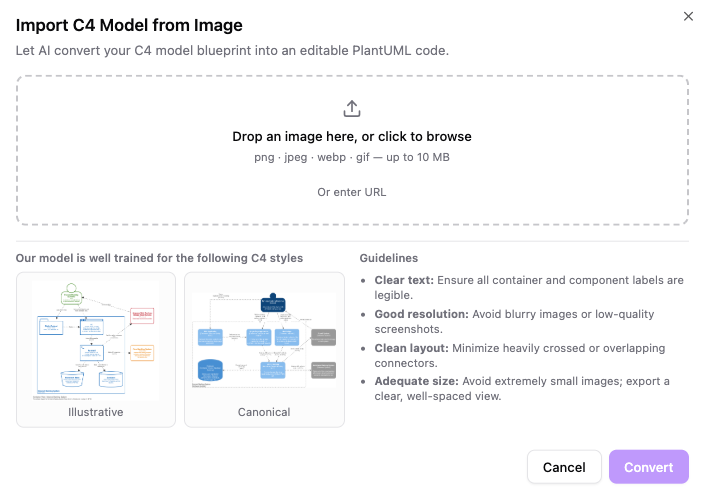
The process begins with the input layer. The system is designed to be agnostic regarding the source of your diagram. Whether you have a high-resolution export of a legacy model or a quick snapshot from a whiteboard session, the AI engine accepts various formats.
The interface supports direct file uploads (PNG, JPEG, WEBP, GIF) and direct URL parsing. This flexibility ensures that even if you don’t have the source file handy, you can paste a link to an image hosted on a wiki or repository to initiate the conversion.
Phase 2: Side-by-Side Verification
Once the image is processed, the AI generates a preliminary version of the PlantUML code. However, relying solely on AI conversion without human oversight is risky. To mitigate this, VPasCode employs a Split-Screen Interface.
This interface places the original static image on one side and the generated diagram preview on the other. This allows the architect to:
- Validate Layout: Ensure the spatial arrangement of containers matches the original intent.
- Check Accuracy: Verify that the AI correctly interpreted the direction of arrows and the labels within the boxes.
- Refine Structure: Use the “smooth pan and zoom” controls to inspect details without losing context.
Phase 3: Seamless On-the-Fly Editing
The conversion is not the end of the journey; it is the beginning of the edit. Because the output is code, the diagram becomes fully editable. You are not forced to accept the AI’s initial guess.
If the AI misidentified a database as a generic component, or if a relationship arrow is missing, you can modify the container names, restructure components, or update relationship paths directly within the editor. This moves the diagram from a static snapshot to a dynamic, editable artifact.
Guidelines for High-Fidelity Conversion
To ensure the AI generates the most accurate code, the input image quality is paramount. The VPasCode model is trained on specific styles, primarily “Illustrative” and “Canonical” C4 diagrams. However, the quality of the source material dictates the success of the translation.
When preparing your diagram for conversion, adhere to the following best practices:
- Clear Text: The OCR engine relies on legibility. Ensure that all container and component labels are sharp and distinct. Blurry text is the leading cause of conversion errors.
- Good Resolution: Avoid low-quality screenshots. High-resolution images provide the AI with the necessary pixel density to distinguish between a “cloud” shape and a “storage” shape.
- Clean Layout: Minimize heavily crossed or overlapping connectors. While AI is powerful, a chaotic web of lines makes it difficult for the model to infer the correct logical flow.
- Adequate Size: Export your view clearly. Extremely small images often result in the AI missing smaller text labels entirely.
Ecosystem Connectivity: From Code to Documentation
The true power of VPasCode lies in its ability to integrate into broader documentation ecosystems. Once your diagram has been converted and refined, it does not sit in isolation.
The generated code can be easily pushed to OpenDocs for centralized technical documentation management. This ensures that your architecture diagrams are always synchronized with your codebase and documentation. Alternatively, for deep enterprise modeling, the code can be escalated to Visual Paradigm Desktop, allowing for complex, multi-diagram project management.
Conclusion
The integration of AI-assisted diagram generation into Visual Paradigm’s VPasCode represents a significant leap forward in architectural modeling. By automating the tedious task of recreating diagrams, architects can focus on the logic and structure of their systems rather than the pixels. Whether you are starting from a whiteboard sketch or a legacy screenshot, the path to a high-quality, editable model is now just a few clicks away.