



In the modern landscape of enterprise software development, the integration of Large Language Models (LLMs) into diagramming and coding tools like VPasCode is a game-changer. However, adopting these powerful AI capabilities requires more than just a simple API key. It demands a robust architecture that balances innovation with strict data governance, security, and performance optimization.
This tutorial explores the “Custom AI Endpoint Support” architecture found within VPasCode. We will walk through how organizations can transition from generic, public AI usage to a fully managed, enterprise-grade infrastructure. By configuring custom endpoints, you gain total control over where your data goes, how it is processed, and how your team interacts with AI-assisted diagram generation.
The Enterprise Integration Architecture
Standard AI tools often route all user requests through a central, public cloud provider. While convenient, this can pose significant risks for organizations handling sensitive intellectual property or regulated data. VPasCode solves this by allowing you to define a Custom AI Endpoint.
This feature enables a direct connection between your organization’s approved AI infrastructure and the VPasCode environment. Instead of sending data to a generic public API, your requests are routed through a specific, managed URL. This architecture supports a “Bring Your Own Model” (BYOM) approach, allowing you to leverage:
- Existing Provider Relationships: Continue using your current contracts with providers like OpenAI, Anthropic, or Google.
- Internal Infrastructure: Point the system to your own self-hosted LLMs running on private clouds or on-premise servers.
- Model Diversity: Access a wide range of models, including DeepSeek, Mistral, Qwen, and specialized enterprise-grade cloud endpoints.
Step-by-Step: Configuring the LLM Connection
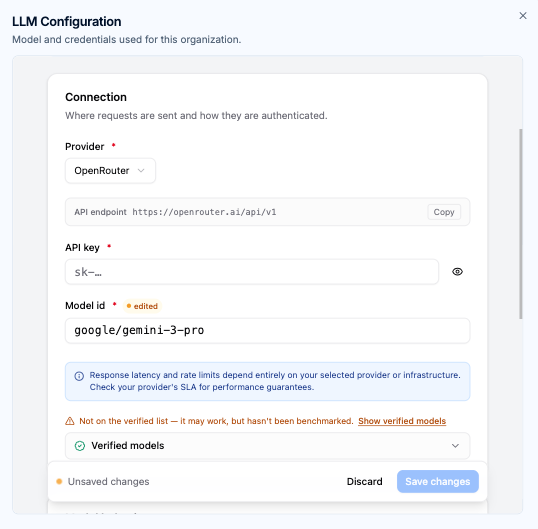
Configuring a custom endpoint involves mapping three critical pillars: Authentication, Routing, and Model Selection. Let’s break down the configuration interface shown in the diagram.
1. Defining the Connection Provider
The first step is identifying the Provider. In the configuration panel, you select the service that hosts your model. This is not just a label; it determines the expected authentication protocol and endpoint structure. For example, if you select “OpenRouter,” the system understands the specific API format required for that aggregator.
2. Specifying the API Endpoint
The API Endpoint field is the heart of this configuration. This is the specific URL where the HTTP requests will be sent. By default, VPasCode might point to a standard location, but for custom support, you enter your organization’s specific gateway URL (e.g., https://your-internal-gateway.ai/api/v1).
Why this matters: This ensures that sensitive data never traverses the public internet to a third-party server unless explicitly authorized. It also allows you to route traffic through a corporate proxy or a specific load balancer designed for your AI workloads.
3. Managing Authentication (API Keys)
Security is paramount. The API Key field allows you to input the credentials required to authenticate your requests. VPasCode handles this securely, ensuring that your key is stored safely within the workspace configuration.
By using a dedicated API key, you enable Dedicated API Management. This allows your organization to:
- Track usage per specific team or project.
- Enforce internal security auditing logs.
- Manage rate limits and usage quotas effectively.
4. Selecting the Model ID
Once the connection is established, you must specify the Model ID. This is the unique identifier for the specific Large Language Model you wish to use. In the example configuration, google/gemini-3-pro is selected.
VPasCode allows for Tailored Model Selection, meaning you can choose the model that fits your specific technical requirements:
- High-Throughput Models: Ideal for rapid iteration, simple diagram generation, or quick code parsing.
- High-Reasoning Models: Essential for complex multi-tier architecture design, intricate code logic, or generating highly accurate system diagrams.
Governance and Operational Safety
Configuring custom endpoints isn’t just about connectivity; it’s about maintaining control over the AI’s behavior and the system’s stability.
Workspace Governance
Through the Centralized Workspace Governance feature, workspace managers can establish workspace-wide AI configurations. This ensures that every team member is operating with the same operational standards, using the same approved models, and adhering to the same data policies. This prevents “shadow AI” usage where individuals might connect to unverified, insecure endpoints.
Behavioral Configuration
Once a model is connected, you can apply Advanced Behavioral Configuration. This allows administrators to fine-tune output parameters, such as:
- Max Output Tokens: Limiting the length of generated content to prevent verbosity.
- Reasoning Effort: Adjusting the computational “thinking” required for complex tasks versus simple ones.
Automated System Fallback
Reliability is critical in development workflows. The Automated System Fallback feature ensures that if your custom routing is disabled or the external endpoint becomes unreachable, the system doesn’t crash. Instead, it instantly falls back to Visual Paradigm’s default AI infrastructure, maintaining continuous operational uptime.
Summary
By leveraging the Custom AI Endpoint Support in VPasCode, organizations can transform their diagramming tools into secure, compliant, and highly efficient engines for software development. You move beyond generic AI assistance to a tailored, enterprise-grade solution that respects your data policies while empowering your team with the latest generative AI capabilities.