

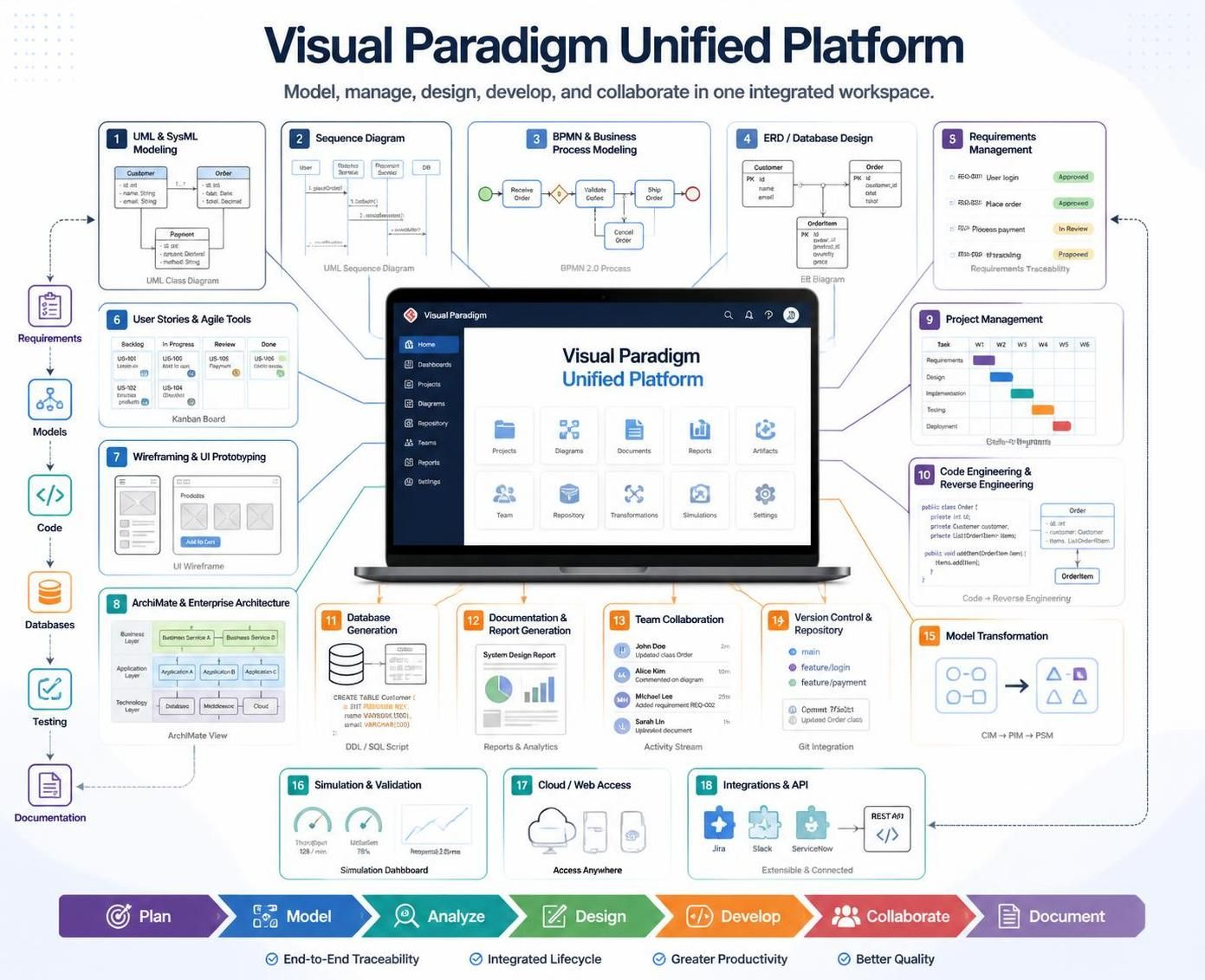
In the modern landscape of software engineering and enterprise architecture, the challenge is no longer just creating diagrams—it is managing the complex web of relationships between business strategy, user experience, system architecture, and actual code implementation. The Visual Paradigm Unified Platform (VPUP) addresses this by serving as a central hub that integrates these distinct phases into a single, cohesive ecosystem.
This tutorial explores the architectural philosophy of the VPUP, moving beyond simple diagramming to a discussion on how a unified workspace facilitates the “Plan, Model, Analyze, Design, Develop, Collaborate, and Document” lifecycle. We will examine the specific capability areas that bridge the gap between abstract requirements and concrete execution.
The Central Hub Philosophy
Traditionally, teams often operate in silos. Business analysts use one tool for requirements, architects use another for Enterprise Architecture (EA), and developers use an IDE for coding. These artifacts are frequently treated as separate deliverables rather than connected elements of a single truth.
The Visual Paradigm Unified Platform shifts this paradigm by acting as a central repository. It connects the following layers:
- Visual Modeling: The foundation of the system, utilizing UML, SysML, and BPMN to represent logic and structure.
- Business Analysis & Agile: Tools for capturing user stories, requirements, and managing backlogs.
- Engineering & Design: Database engineering, code generation, and UX prototyping.
- Collaboration & AI: Shared workspaces and intelligent assistance.
This integration allows for End-to-End Traceability. A requirement captured in the “Requirements Management” module can be traced through the “Sequence Diagram,” down to the “Database ER Diagram,” and finally linked to the actual “Source Code.”
Core Capability Areas
The platform organizes its vast feature set into specific capability areas that map directly to the roles within a software project.
1. Visual Modeling and Enterprise Architecture
At the heart of the platform is the ability to create standard industry diagrams. This includes UML (Unified Modeling Language) for software structure, SysML for systems engineering, and ArchiMate for enterprise architecture.
When modeling, users are not just drawing shapes; they are defining the semantics of the system. For example, a Class Diagram defines the data structure, while a Sequence Diagram defines the interaction flow between objects. The platform supports round-trip engineering, meaning changes in the diagram update the code, and changes in the code update the diagram.
2. Business Analysis and Agile Management
Bridging the gap between business needs and technical execution, the platform offers robust tools for BPMN (Business Process Model and Notation) and Agile management.
Teams can create User Story Maps and Kanban Boards to visualize the flow of work. This ensures that the “What” (Business Requirements) is directly connected to the “How” (Technical Implementation). For instance, a decision table in the business analysis phase can be directly linked to a business rule in the BPMN process.
3. Database and Code Engineering
One of the most powerful aspects of the Unified Platform is its ability to handle data and code natively.
- Database Engineering: Users can design ER Diagrams (Entity-Relationship) and generate DDL (Data Definition Language) scripts automatically. This eliminates manual errors in writing SQL scripts.
- Code Engineering: The platform supports Reverse Engineering from existing codebases (Java, C#, Python, etc.) to create visual models. It also supports Round-Trip Engineering, allowing for synchronization between the model and the source code.
4. UX and Product Design
The platform extends into the realm of User Experience (UX) by supporting wireframing and prototyping. Teams can create Wireframes, Storyboards, and User Journeys to validate the user interface before a single line of code is written. This iterative design process ensures that the final product meets user expectations.
The AI Ecosystem and Modern Workflows
The evolution of the Visual Paradigm Unified Platform includes the integration of an AI Ecosystem. This is not merely an add-on but a fundamental part of the workflow, offering “AI-assisted work” capabilities.
Key AI-driven features include:
- Text-to-Diagram: Users can describe a system concept in natural language, and the AI can generate the corresponding UML or BPMN diagram.
- Model Analysis: AI can analyze existing models for potential inconsistencies or areas for optimization.
- Diagram Refinement: Intelligent suggestions for layout and connectivity can help maintain clean, professional diagrams.
This integration transforms the platform from a static drawing tool into an intelligent workspace that accelerates the modeling process.
Collaboration and Cloud Integration
The Unified Platform is designed for distributed teams. It supports Cloud-based applications and Web-based access, ensuring that team members can access the latest artifacts from any device.
Key collaboration features include:
- Shared Workspaces: Real-time collaboration on diagrams and documents.
- Version Management: Robust tracking of changes, ensuring that teams can revert to previous versions if necessary.
- Integration: The platform integrates with external tools like Jira, Slack, and ServiceNow, creating a seamless workflow between the modeling environment and project management tools.
Conclusion
The Visual Paradigm Unified Platform represents a significant step forward in systems engineering and software development. By consolidating modeling, analysis, design, and collaboration into a single hub, it reduces the friction between different stages of the lifecycle. Whether you are an architect defining the high-level strategy or a developer implementing the code, the platform provides the tools to ensure that your vision is accurately translated into reality.