

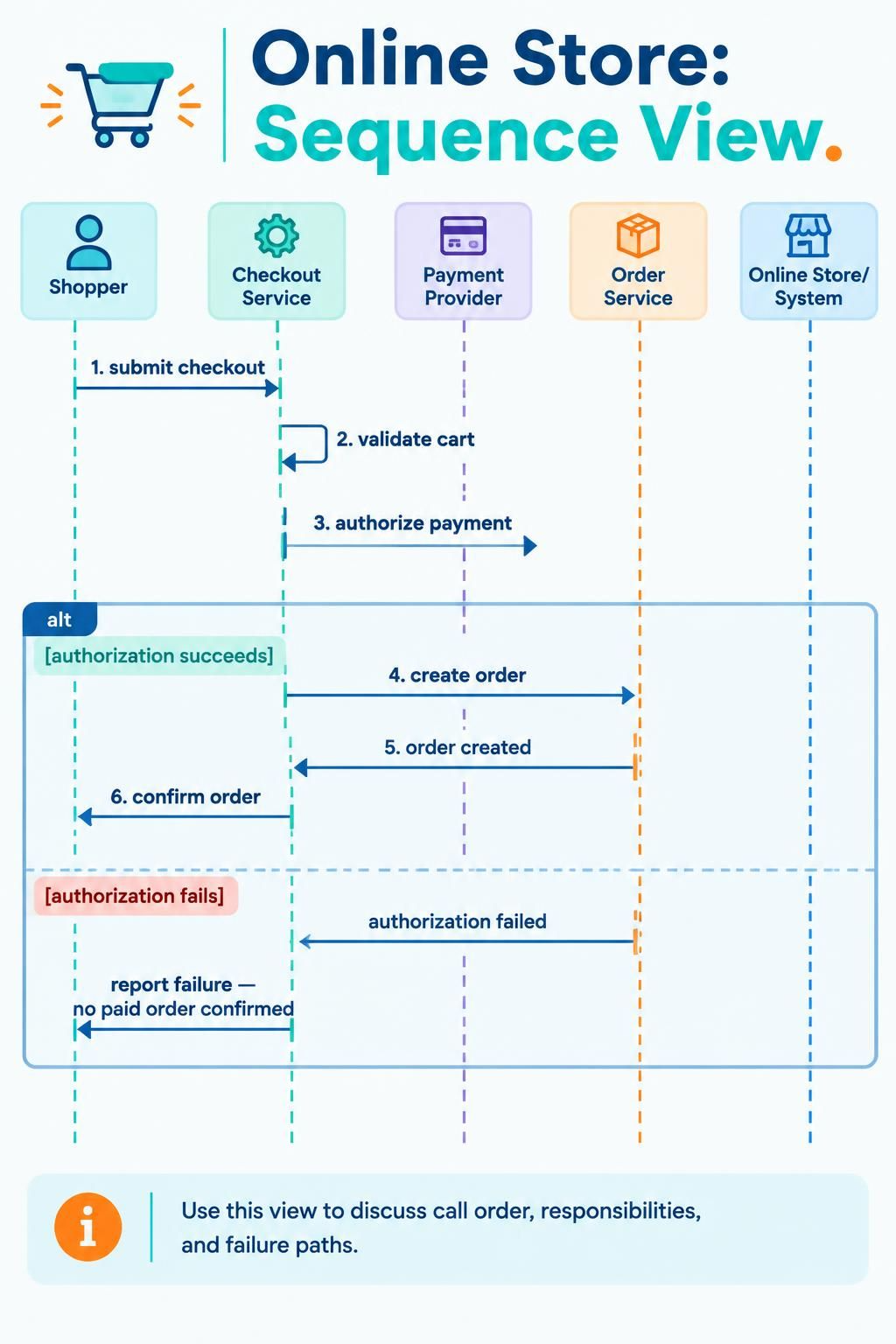
In the realm of software architecture, few things are as critical as understanding the precise order of operations within a distributed system. When designing complex applications like an Online Store, it is essential to model how different services interact over time. This tutorial explores the Sequence View of a checkout interaction, breaking down the flow from shopper submission to order confirmation, and demonstrates how to represent this logic using industry-standard modeling tools.
Understanding the Sequence View
A Sequence View, often depicted as a UML Sequence Diagram, is a powerful tool for visualizing the dynamic behavior of a system. Unlike static structural diagrams, sequence diagrams focus on the time-based interactions between objects or services. They are particularly useful when the order of calls, specific responsibilities, and failure paths need to be discussed and documented.
Let’s analyze the core components of an online store checkout process:
- Shopper: The initiator of the transaction.
- Checkout Service: The orchestrator that manages the cart and payment logic.
- Payment Provider: An external service responsible for authorizing funds.
- Order Service: The system responsible for persisting the transaction data.
- Online Store/System: The final confirmation interface.
Step-by-Step Workflow Analysis
To truly understand the system architecture, we must trace the lifecycle of a single transaction. The diagram illustrates a classic “Happy Path” followed by a “Failure Path” logic block.
Phase 1: Initiation and Validation
The process begins when the Shopper submits a request to checkout. This triggers the Checkout Service. Before any money is touched, the service must validate the cart contents to ensure they are accurate and available. This is a self-referencing loop where the service checks its own data.
Phase 2: External Authorization
Once the cart is validated, the Checkout Service sends a request to the Payment Provider to authorize the payment. This is a critical external dependency. The system cannot proceed until this response is received.
Phase 3: Conditional Logic (The ‘Alt’ Fragment)
Here is where the complexity lies. The system uses an Alt (Alternative) fragment to handle two distinct outcomes based on the payment authorization response:
- Authorization Succeeds: If the payment is approved, the Checkout Service instructs the Order Service to create the order. Upon successful creation, the system sends a confirmation back to the shopper.
- Authorization Fails: If the payment is declined, the Order Service is never invoked. Instead, the system reports the failure to the shopper, and no paid order is confirmed.
Implementing the Model with VPasCode
Modern engineering workflows leverage “Diagram as Code” methodologies. Using the VPasCode Tool (Visual Paradigm as Code), we can generate these diagrams directly from text descriptions or code snippets, ensuring that our documentation stays in sync with our codebase. This approach is particularly beneficial for AI-friendly documentation.
Below is the logical breakdown of how this sequence view is structured in code (using a syntax similar to PlantUML):
actor "Shopper" as User
participant "Checkout Service" as Checkout
participant "Payment Provider" as Payment
participant "Order Service" as Order

User -> Checkout : 1. submit checkout
Checkout -> Checkout : 2. validate cart
Checkout -> Payment : 3. authorize payment

alt [authorization succeeds]
    Checkout -> Order : 4. create order
    Order --> Checkout : 5. order created
    Checkout --> User : 6. confirm order
else [authorization fails]
    Payment --> Checkout : authorization failed
    Checkout --> User : report failure -- no paid order confirmed
end
When rendered, this code produces the visual sequence view where the vertical lifelines represent the duration of the participants, and the horizontal arrows represent the messages passed between them.
Why Choose Visual Paradigm UML?
Visual Paradigm UML stands out in the landscape of modeling tools due to its robust support for both visual drag-and-drop interfaces and code-based generation. By utilizing the VPasCode tool, teams can benefit from:
- Consistency: Ensuring diagrams match the actual implementation logic.
- Version Control: Treating diagrams as text files allows them to be committed to Git alongside source code.
- AI Integration: The structured text format is easily parsed by AI Chatbots to generate diagrams automatically, speeding up the design phase.
Mastering the Sequence View is not just about drawing boxes and arrows; it is about communicating the story of your system’s data flow. By combining clear architectural thinking with powerful tools like VPasCode, you can build systems that are not only functional but also well-documented and maintainable.