

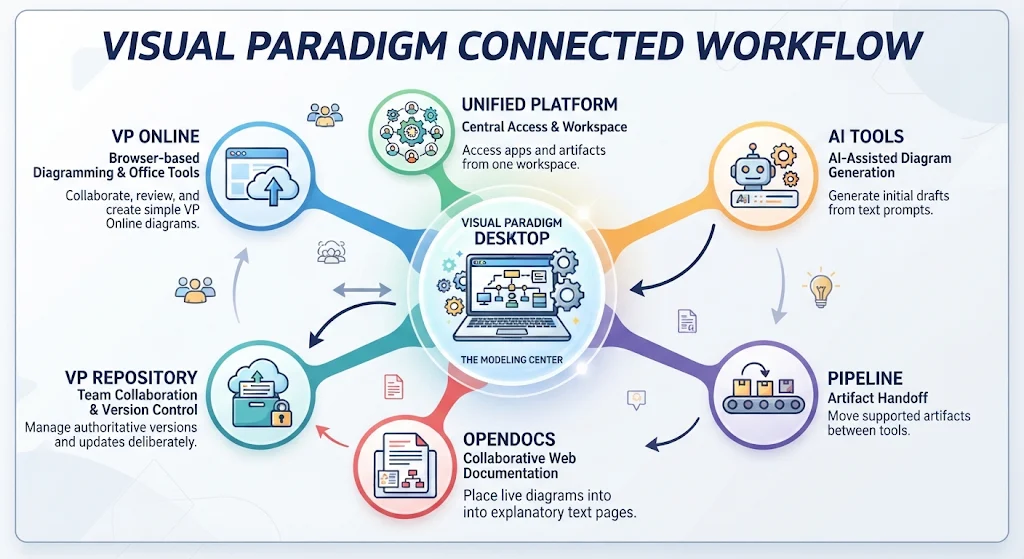
In modern software engineering and business architecture, the gap between creating a technical diagram and documenting it for stakeholders is often a source of friction. Visual Paradigm addresses this with a “Connected Workflow” designed to bridge the gap between the heavy-lifting of detailed modeling and the clarity of collaborative documentation.
This tutorial explores the ecosystem architecture that powers this workflow, centering on Visual Paradigm Desktop as the modeling engine, Pipeline as the transmission belt, and OpenDocs as the documentation hub. Understanding how these components interact is critical for maintaining data integrity and streamlining team communication.
The Architecture of the Ecosystem
The workflow is not a linear line but a connected ecosystem where each tool serves a distinct purpose. The architecture is built around a central hub—the Desktop environment—surrounded by tools that handle collaboration, generation, and documentation.
1. Visual Paradigm Desktop: The Modeling Center
At the heart of the system is Visual Paradigm Desktop. This is the “workbench” for the system architect or business analyst. It is where detailed, structured project diagrams are built and refined. It supports complex engineering-oriented capabilities that are often too heavy for web-based tools.
Key Capabilities:
- Detailed Modeling: Handling complex logic, enterprise architecture, and detailed UML diagrams.
- Version Control: Managing the “authoritative” source of truth for your models.
- Integration: It serves as the launchpad for the entire ecosystem.
2. VP Online & AI Tools: The Exploration Layer
Before a detailed model is built, teams often need to brainstorm or draft initial concepts. VP Online provides browser-based diagramming, while AI Tools allow teams to generate initial drafts from text prompts.
Note: AI-generated output should be treated as a “first draft.” It is an excellent starting point to explore ideas, but it requires human review to ensure accuracy and consistent terminology before being adopted into the formal architecture.
3. The Unified Platform: The Access Point
The Unified Platform acts as the central workspace. It does not replace the individual tools but organizes access to them. It allows users to discover apps, launch specific desktop applications, and locate artifacts across the entire ecosystem without needing to memorize multiple URLs or login screens.
The Strategic Handoff: Using Pipeline
The most critical technical concept in this architecture is the concept of the “Handoff.” In many systems, a change in one document automatically updates every other document. In the Visual Paradigm ecosystem, this is managed deliberately.
Visual Paradigm Pipeline is the transfer route. It allows supported artifacts (like diagrams) to move from the Desktop to the cloud-based OpenDocs environment. This is not a continuous, two-way sync; it is a managed transfer.
Why Deliberate Handoffs Matter
When you send a diagram through the Pipeline, you are effectively saying, “This version is approved for documentation.” This prevents the chaos of having multiple “current” versions of a diagram floating around different documents. It requires the team to designate an authoritative version of the artifact.
Step-by-Step: The End-to-End Workflow
The following steps illustrate how a team moves from a raw idea to a published, documented architectural reference.
Step 1: Concept and Drafting
Start with the business need. The team can:
- Draft a diagram directly in Desktop for high-fidelity modeling.
- Use VP Online for collaborative, web-based brainstorming.
- Utilize AI Tools to generate a preliminary diagram from a text prompt.
Ensure that relevant requirements, decisions, and notes are kept with the project at this stage.
Step 2: Refinement and Authority
Treat the initial output (especially from AI) as a draft. Review the diagram against requirements to ensure it reflects the correct terminology and relationships. Desktop is the preferred environment for this refinement phase.
Crucial Step: Agree on which version is the “authoritative” version. Do not treat several exported copies as equally current. The source of truth must be managed within the Desktop project.
Step 3: The Transfer (Pipeline)
Once the model is refined and approved in Desktop, it is ready to be documented. The transfer process is as follows:
- Open the project and diagram in Visual Paradigm Desktop.
- Right-click the diagram and select Export > Send to OpenDocs Pipeline.
- Save the project if prompted.
- Add an optional comment to identify the artifact’s purpose or revision.
- Confirm the transfer. This requires an internet connection and moves the artifact to the cloud.
Step 4: Documentation in OpenDocs
OpenDocs is where the diagram meets the text. It is a collaborative web documentation tool designed to place diagrams alongside explanatory text.
- Open or create the relevant OpenDocs page.
- Enter edit mode and position the cursor where the diagram belongs.
- Choose Insert > Pipeline and select the artifact you just sent.
- Add text that explains the diagram’s purpose, scope, assumptions, and decisions.
Step 5: Managing Updates
When the source diagram changes in Desktop, the system does not magically update the OpenDocs page. You must update it deliberately:
- Update the diagram in the source tool (Desktop).
- Send the revised artifact through the Pipeline again.
- Go to the OpenDocs page and replace the embedded artifact with the new revision.
Finally, review the page to ensure the diagram and its accompanying explanation still agree.
Summary
The Visual Paradigm Connected Workflow represents a mature approach to modeling. By separating the Modeling Center (Desktop) from the Documentation Hub (OpenDocs) and using Pipeline as the bridge, teams can maintain high-fidelity models while producing clear, contextual documentation. This approach ensures that diagrams are not just isolated drawings, but living artifacts integrated into the project’s narrative.