

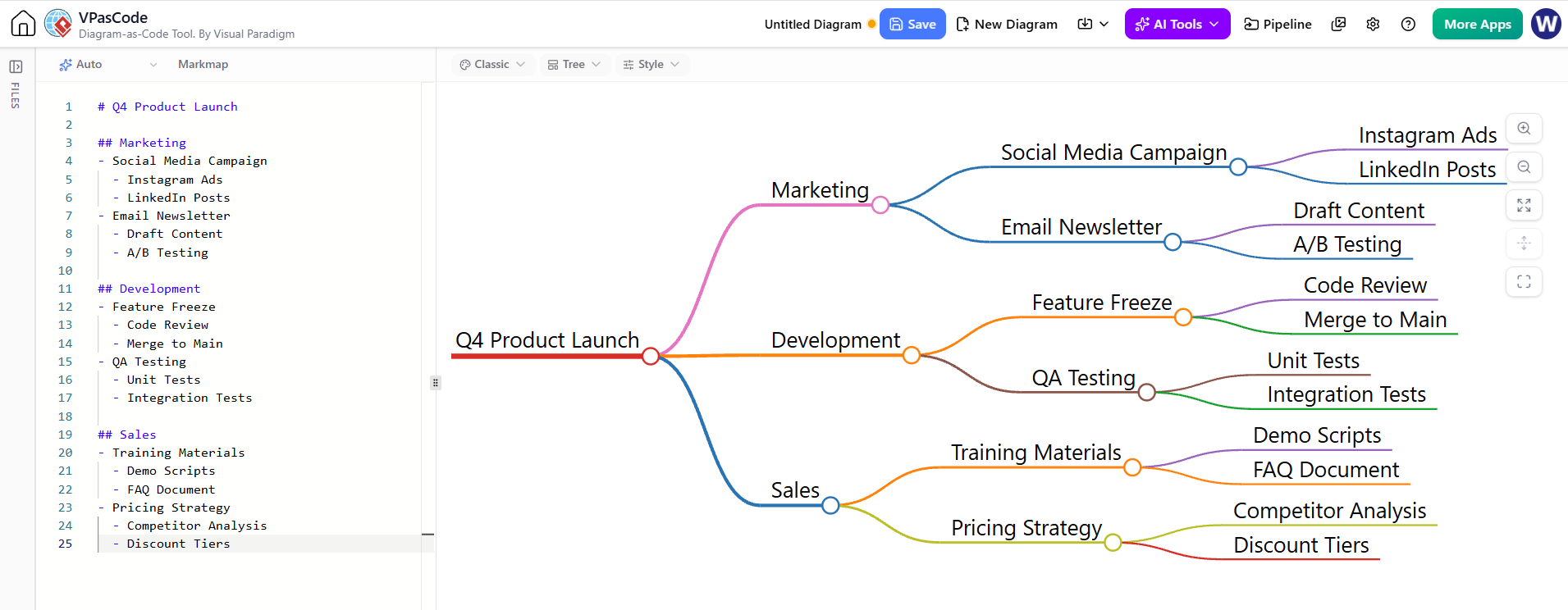
Welcome, learners. Today we are moving beyond the limitations of the traditional canvas. We are going to explore a paradigm shift in how we visualize information, structure data, and collaborate on complex ideas. This tutorial focuses on the synergy between Visual Paradigm Markmap and the VPasCode ecosystem, specifically leveraging the power of “Diagram-as-Code” and Artificial Intelligence to supercharge your brainstorming and knowledge organization.
1. The Shift from Canvas to Code
Traditionally, mind mapping has been a visual exercise. You drag a box, draw a line, and hope it looks good. While intuitive, this approach breaks down when dealing with version control, large-scale collaboration, or complex data integration. It is hard to track changes in a drag-and-drop interface when five people are editing simultaneously.
Enter the Diagram-as-Code philosophy. This approach treats diagrams not as static images, but as text files. By writing the structure of your map in a structured text format (like Markdown), you gain the benefits of software development: version control, diff tracking, and programmatic generation.
Why Adopt This Method?
- Version Control: Store your mind maps in Git repositories alongside your codebase.
- Collaboration: Review changes via Pull Requests just like you would review code.
- Automation: Generate diagrams programmatically from data sources.
- Portability: Share a simple text file that renders anywhere.
2. The VPasCode & Markmap Architecture
Visual Paradigm has integrated Markmap into its VPasCode tool, bridging the gap between simple text editors and powerful visualization engines. The architecture follows a “Write-Render” model.
Step 1: The Input Layer (Markdown)
The foundation of this system is Markdown. It is the universal language of documentation. In this context, Markdown hierarchy determines the visual hierarchy.
#represents the Central Topic.##represents the Main Branches.###represents Sub-branches.-represents Leaf nodes (detailed items).
Step 2: The Rendering Engine (Markmap)
The engine parses this text and converts the abstract hierarchy into a dynamic, interactive graph. It calculates the layout, coloring, and connecting lines automatically, ensuring the map remains balanced and readable.
Step 3: The AI Extension (VPasCode)
This is where the magic happens. VPasCode acts as the orchestrator. It doesn’t just render text; it can generate that text for you using Large Language Models (LLMs). You provide a prompt, and the AI constructs the initial Markdown structure.
3. Practical Application: Brainstorming & Ideation
Let us walk through a practical scenario: planning a new product feature. Instead of staring at a blank whiteboard, we utilize the VPasCode AI assistant.
Phase A: AI-Assisted Drafting
Open the VPasCode interface and access the AI Tools. Instead of typing node by node, you describe the goal.
Example Prompt: “Create a mind map for launching a new AI-powered meeting summarizer product. Include branches for Product Features, Go-to-Market Strategy, Technical Infrastructure, and Customer Support.”
The AI parses this request and outputs a structured Markdown block. This serves as your “Rough Sketch” but with high fidelity immediately.
Phase B: Human Refinement
Now, you are the architect. You review the AI-generated branches. You might notice that “Technical Infrastructure” is too vague. You edit the text directly in the editor:
- Change “Technical Infrastructure” to “Backend API Architecture” and “Database Design”.
- Add a new branch for “Compliance & Security”.
- Refine the leaf nodes to be more actionable keywords.
4. Advanced Concept: Knowledge Organization
While brainstorming is great, this system shines for Knowledge Management. Imagine you are studying a complex topic or organizing a library of research papers. You can use the VPasCode tool to structure your entire knowledge base.
By using PlantUML or Mermaid syntax within VPasCode, you can create “Diagram-as-Code” files that are not just for brainstorming, but for documenting system architecture and relationships.
The Hierarchy Principle
Remember that the power of this tool lies in the Hierarchical Structure. The system is designed to move from general (the center) to specific (the outer branches). This allows you to:
- Identify Gaps: If a branch is sparse while others are dense, you know where your knowledge or planning is lacking.
- Prioritize: The visual weight of the branches helps you decide what is most important.
5. Integrating with the Developer Workflow
For developers and technical writers, this tool is a game-changer. You can write your documentation in Markdown and have it automatically render into a visual diagram within your IDE (like VS Code) or documentation platform (like Confluence).
This creates a Living Documentation system. When you update the code or the requirements, you update the text file. The diagram updates automatically. There is no more “diagram out of sync with reality.”
6. Tips for Mastery
To truly master this workflow, follow these best practices:
- Start Simple: Don’t try to map the whole universe. Start with the central idea and the top 3-5 branches.
- Iterate with AI: Use the AI to generate a draft, then manually refine. This saves time while ensuring accuracy.
- Use Colors Strategically: Assign colors to different categories (e.g., Blue for Technical, Green for Marketing) to improve visual scanning.
- Export and Embed: Don’t keep your maps locked in the editor. Export them as SVG or PNG, or embed the interactive version directly into your project documentation.
Conclusion
The integration of Visual Paradigm Markmap and VPasCode transforms mind mapping from a static exercise into a dynamic, version-controlled, and collaborative process. By combining the simplicity of Markdown with the power of AI, you unlock a new level of efficiency. Whether you are a product manager, a student, or a developer, these tools empower you to think visually and act decisively. Start small, experiment with different formats, and let your code drive your creativity.