

In the rapidly evolving world of enterprise architecture, clarity is king. When stakeholders ask, “How does our entire portfolio of software systems fit together?”, the answer is rarely found in a single monolithic document. It is found in a System Landscape Diagram. This high-level view acts as the “map” for the software ecosystem, allowing teams to understand dependencies, identify risks, and onboard new members effectively.
However, creating these diagrams can be a challenge. Do you draw them by hand? Do you type them out? How do you keep them accurate when the software changes? This tutorial explores a modern, dual-path approach to mastering C4 Landscape diagrams using Visual Paradigm’s ecosystem, specifically leveraging both its visual modeling tools and the text-based VPasCode editor enhanced with AI.
1. The Concept: What is a System Landscape Diagram?
Before diving into the tools, we must understand the artifact. A C4 Landscape diagram is a “system-context view” without a single specific system in focus. Instead of zooming in on one application, it steps back to show the systems and people within a chosen organizational scope.
Unlike detailed context diagrams that focus on a single system’s boundaries, a landscape view answers questions like:
- Which systems exist in the Customer Services portfolio?
- How does the Order Management System interact with the Warehouse System?
- Who are the external partners (e.g., Payment Providers) we rely on?
Key Principles for Success:
- Scope is Everything: Do not attempt to map every system in the world. Define a boundary (e.g., “Retail Operations” or “Northwind Services”) and stick to it.
- Consistency: Keep the level of detail uniform. Do not mix Systems with Containers or Components on the same view unless absolutely necessary.
- Relationships over Inventory: A box with no connections is just a list item. The value of the landscape lies in the labeled interactions (e.g., “Submits orders,” “Authenticates users”).
2. The Visual Paradigm Ecosystem: Two Paths to the Same Goal
Visual Paradigm offers a flexible environment for architects. You can choose a visual-first approach or a code-first approach, or even a hybrid. Understanding the strengths of each is crucial for building a robust architecture workflow.
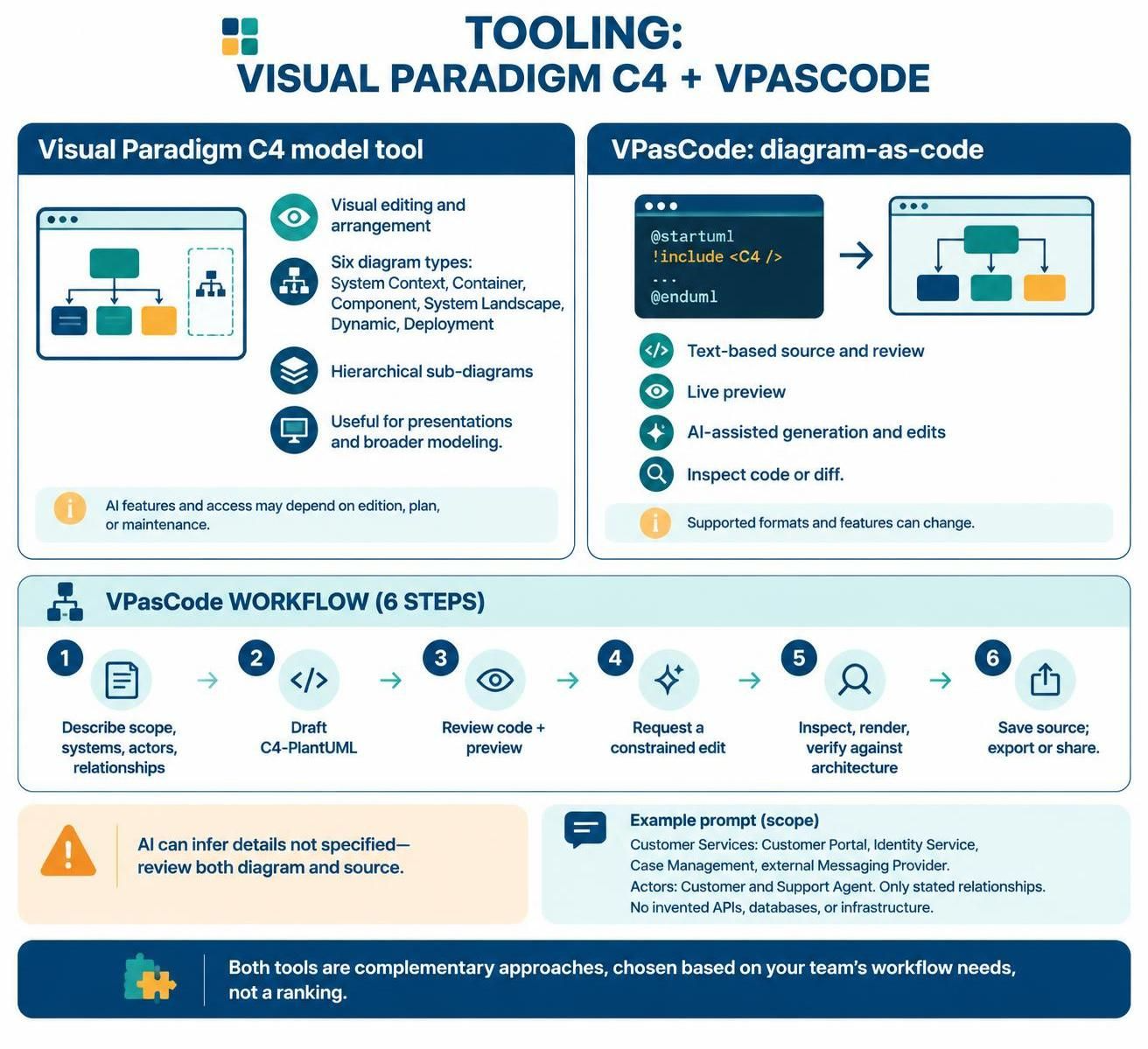
Path A: Visual Paradigm C4 Model Tool
This is the traditional, graphical approach. It is ideal for teams that prefer manipulating elements on a canvas, dragging and dropping boxes, and seeing the hierarchical relationships visually.
- Best for: Architects who want to create broad models, presentations, and hierarchical diagrams where visual flow is prioritized.
- Features: Supports all six C4 diagram types, allows for hierarchical sub-diagrams (drilling down from landscape to context to container), and integrates with cloud-based studios.
Path B: VPasCode (Diagram-as-Code)
This is the modern, text-driven approach. VPasCode allows you to write C4-PlantUML code directly in the browser with live previews. This path is increasingly popular in Agile EA teams because it treats architecture as software.
- Best for: Teams that want version control, reviewable changes, and the ability to use AI to draft or modify diagrams.
- Features: Text-based source control, AI-assisted generation, and the ability to render code instantly into diagrams.
3. The Workflow: From Concept to Code with AI
Using the VPasCode editor, you can adopt a “Diagram-as-Code” workflow that integrates seamlessly with Agile processes. Here is a step-by-step guide to creating a landscape diagram using this method.
Step 1: Define the Scope and Audience
Start by clarifying the purpose. Are you building a map for new hires? Or are you planning a migration? Define the boundary clearly.
Example Prompt: “Create a C4-PlantUML system landscape for the Customer Services department. Include the Customer Portal, Identity Service, Case Management, and external Messaging Provider. Actors: Customer and Support Agent.”
Step 2: Draft the Code
In VPasCode, you can write the C4-PlantUML syntax manually or use AI to generate a draft. The AI is excellent at setting up the structure, but it cannot know your specific business rules.
Step 3: Verify and Refine
This is the most critical step. AI can hallucinate relationships. You must inspect the generated code and the rendered diagram side-by-side. Ask: “Is this relationship accurate?” “Did the AI invent a database that doesn’t exist?”
Step 4: Link to Deeper Views
A landscape diagram should never stand alone. Use the code to add links (hyperlinks) to more detailed diagrams. For example, a “Subscription Platform” box in the landscape should link to its specific Context or Container diagram.
4. Common Mistakes to Avoid
Even with powerful tools, it is easy to fall into traps that make your architecture documentation less effective.
- Mixing Levels of Abstraction: Never put a “Component” inside a “System” box on a landscape diagram. Keep it strictly at the System level.
- Overloading Boxes: Do not turn your landscape into a technology inventory. Avoid listing every API endpoint, database schema, or server node. That belongs in a Deployment or Container view.
- Ignoring Boundaries: Make sure it is obvious what is inside your scope and what is external (SystemExt). Use
EnterpriseBoundary macros to visually frame your scope. - Stale Documentation: The biggest risk is a diagram that looks good but is wrong. Assign an owner to maintain the view and review it when major dependencies change.
5. Why “Diagram-as-Code” Matters for Agile EA
For Agile Enterprise Architecture teams, the ability to version control diagrams is a game-changer. When you write your architecture in code (like PlantUML), you can:
- Review Changes: Just like code, you can see exactly what changed in the source (e.g., a new relationship added) via Git diffs.
- Ensure Repeatability: The diagram is generated from a single source of truth. No more “Version 1finalv2.pdf” files.
- Leverage AI: You can ask AI to “Add the Payment Provider system and label the relationship,” and it updates the code instantly.
Conclusion
Whether you prefer the visual elegance of the Visual Paradigm C4 Model Tool or the rigorous, version-controlled nature of VPasCode, the goal remains the same: to provide a clear, shared picture of the software landscape. By combining these tools with a disciplined workflow that emphasizes scope, accurate relationships, and AI-assisted drafting, your team can create architecture diagrams that truly serve the organization.