

In the rapidly evolving landscape of Agile Enterprise Architecture (EA), the gap between static architectural design and dynamic runtime reality often widens. While C4 container diagrams provide a clear map of what software components exist, they frequently leave a critical question unanswered: where does the software actually run? This tutorial explores a robust solution that combines the structured modeling of Visual Paradigm, the version-control-friendly nature of diagram-as-code, and the drafting efficiency of AI tools like VPasCode.
The Strategic Role of the Deployment View
The C4 deployment diagram is the bridge between the logical architecture and the physical infrastructure. Unlike its static predecessors, the deployment view is inherently runtime-centric. It answers practical operational questions by mapping instances of software systems and containers onto specific deployment nodes—such as cloud regions, Kubernetes clusters, or virtual machines.
For Agile EA teams, this view is indispensable for communicating production topology, infrastructure boundaries, and network paths. It is not merely a drawing; it is a document that aligns developers, operations staff, and architects on how the system is realized in a specific environment, whether that be production, staging, or disaster recovery.
Workflow Selection: Visual Paradigm vs. Diagram-as-Code
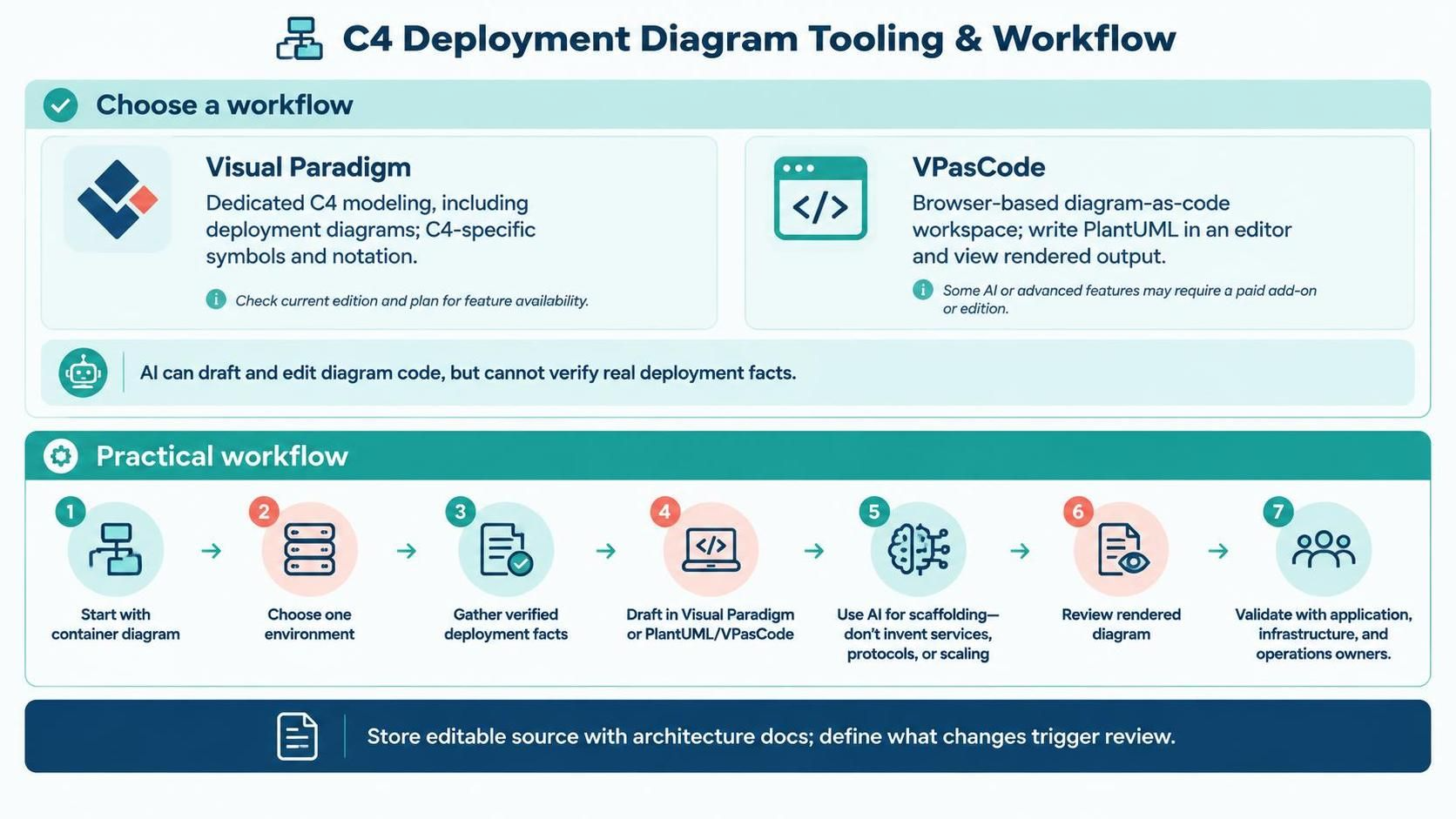
To create these diagrams effectively, teams must choose a workflow that fits their documentation strategy. The modern approach often leverages a hybrid of tools to maximize efficiency.
Visual Paradigm: The Structured Approach
Visual Paradigm offers a dedicated C4 modeling environment. This is ideal for teams that prefer a visual modeling workflow with C4-specific symbols and notation. It supports the creation of deployment diagrams with a focus on structured editing, allowing architects to build a dedicated C4 view without wrestling with raw syntax.
VPasCode: The Diagram-as-Code Approach
VPasCode provides a browser-based workspace for writing diagram code, typically using PlantUML. This “diagram-as-code” approach is particularly valuable for Agile teams because it treats architecture documentation as source code. Benefits include:
- Reviewable Changes: Edits to a text file can be inspected via version control diffs, just like software code.
- Repeatable Rendering: The same source code can be rendered repeatedly to ensure consistency.
- Easy Iteration: Text-based editing is often faster than manually dragging and dropping shapes.
Integrating AI for Drafting and Scaffolding
Artificial Intelligence has transformed the initial drafting phase of architecture documentation. Both Visual Paradigm and VPasCode leverage AI to assist in generating diagram code from written descriptions. However, it is crucial to understand the role of AI in this workflow.
AI is a powerful scaffolding tool, not an authority. It can take a prompt describing your environment and generate a first draft of the deployment diagram, saving time on syntax and initial layout. However, AI cannot verify real deployment facts. It may invent non-existent nodes, assume incorrect network paths, or guess at scaling behaviors. The architect’s responsibility is to review every generated element against the current, actual deployment.
Step-by-Step: The Practical Deployment Workflow
To create a high-quality C4 deployment diagram that serves both documentation and operational needs, follow this structured workflow:
1. Start with the Container Diagram
Begin by identifying the application and data-store containers defined in your static architecture model. The deployment view should correspond to this model, reusing the same container names and identifying deployed instances clearly.
2. Choose One Environment
A deployment diagram is environment-specific. Do not attempt to combine production, staging, and development into a single unreadable view. Decide whether your current diagram represents production, staging, or another named environment, and state this context clearly in the title or scope description.
3. Gather Verified Deployment Facts
Before drafting, confirm the hosting nodes, instance counts, and major infrastructure dependencies with the teams responsible for the system. This ensures the diagram is a factual record rather than a theoretical guess.
4. Draft the Diagram (Visual Paradigm or VPasCode)
Use your chosen tool to draft the diagram. Whether you are using the visual interface of Visual Paradigm or the text editor of VPasCode, focus on showing which software instances are hosted where and the important connections between them.
5. Use AI for Scaffolding
Utilize AI-assisted generation to create a first draft. This is particularly effective in VPasCode, where you can prompt the tool to generate PlantUML code based on your environment description. This gets the “blank page” problem solved quickly.
6. Review Rendered Output
Check the legibility, naming consistency, and scope of the rendered diagram. Ensure that relationships are labeled with useful information, such as the direction of communication or the protocol (e.g., “HTTPS” instead of just a line).
7. Validate with Engineers
Finally, validate the diagram with application, infrastructure, and operations owners. Ask them to confirm the factual deployment details. This step is critical to ensure the diagram accurately reflects the real system.
Best Practices for C4 Deployment Diagrams
To ensure your diagrams remain useful over time, adhere to these best practices:
- Keep it Selective: Omit resources that don’t affect the architectural story. Avoid turning the diagram into a full cloud provider resource inventory.
- Use Nesting for Hierarchy: Use nested nodes to show infrastructure hierarchy (e.g., a cloud region containing a cluster), but only to the level necessary to explain the placement.
- Label Relationships: Label connections with protocols or connection purposes when they matter to the reader.
- Store Editable Source: If using diagram-as-code, store the editable source with your architecture documentation. Define what changes should trigger a review to keep the diagram current.
Conclusion
A C4 deployment diagram is more than just a visual aid; it is a vital communication tool that connects the architecture described by static views to the infrastructure of a specific environment. By leveraging the structured modeling of Visual Paradigm, the text-based iteration of VPasCode, and the drafting speed of AI, Agile EA teams can produce accurate, maintainable, and insightful architecture documentation.