



In the rapidly evolving landscape of technical documentation, the traditional silo between “writing” and “modeling” has become a significant bottleneck. Historically, engineers have relied on external diagramming tools (like Visio or separate UML editors) while writers use standard word processors or wiki platforms. This fragmentation leads to version control nightmares and outdated documentation.
This tutorial explores the system architecture and conceptual framework of Visual Paradigm OpenDocs, a platform designed to bridge this gap. By analyzing the interface shown in the provided context, we will understand how OpenDocs integrates complex modeling capabilities directly into a knowledge management workflow, creating a “single source of truth” for organizations like TechFlow.
The Core Philosophy: Unified Context
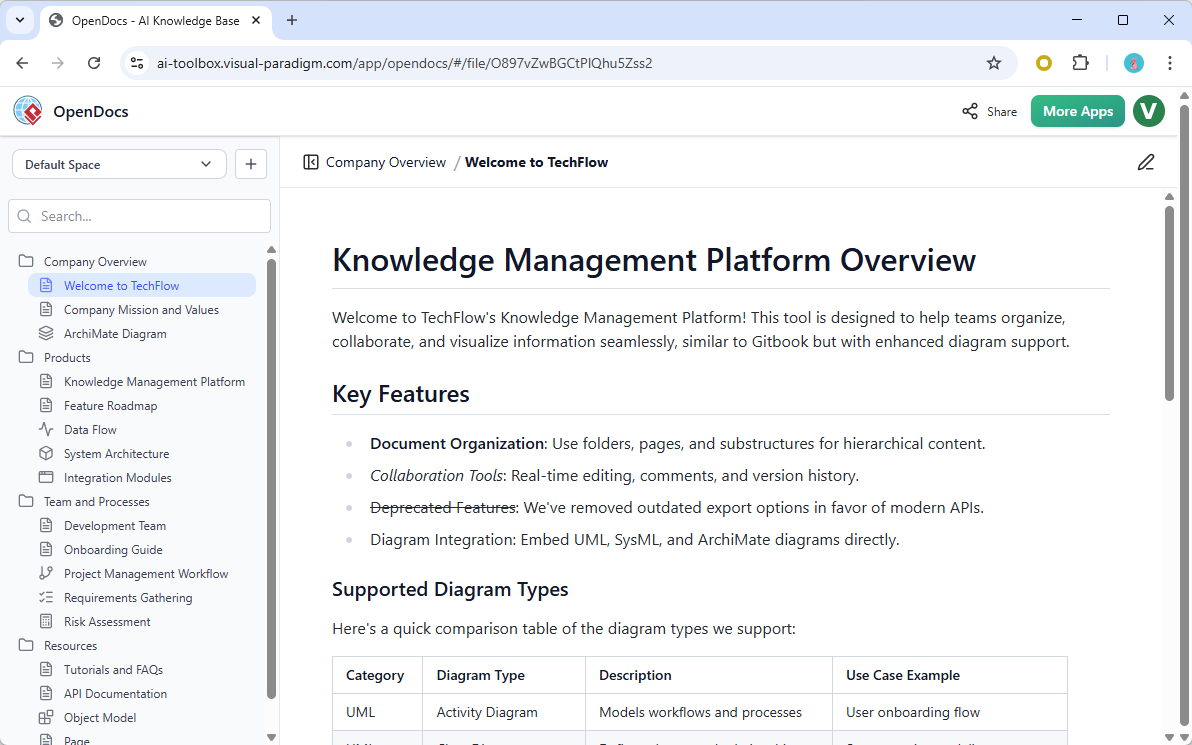
The screenshot of the OpenDocs interface reveals a fundamental shift in how technical information is consumed. The platform operates on a Unified Context architecture. Unlike traditional systems where a diagram is an attached file (e.g., a .png or .vsdx file), OpenDocs treats diagrams as first-class citizens within the document structure.
As noted in the platform’s overview, the architecture supports:
- Hierarchical Content: The sidebar navigation mirrors a file system, allowing for deep nesting of documentation (e.g., Company Overview > Products > Knowledge Management Platform).
- Embedded Visualization: The platform explicitly lists support for UML, SysML, and ArchiMate diagrams embedded directly into the text flow.
- Workflow Continuity: By eliminating the need to switch applications, the cognitive load on the user is reduced, allowing for a seamless transition from reading a requirement to visualizing a data flow.
System Architecture Analysis
To understand how OpenDocs achieves this integration, we must look at the architectural layers presented in the interface.
1. The Document Management Layer (DML)
The left-hand sidebar represents the DML. In a standard wiki, this is often just a list of pages. In OpenDocs, this structure is metadata-rich. The hierarchy allows for:
- Scoped Collaboration: Teams can be granted access to specific folders (e.g., “Development Team” vs. “Requirements Gathering”).
- Versioning: The “Version History” mentioned in the key features implies a robust backend database that tracks changes at the document node level, not just file revisions.
2. The Visualization Kernel
The most critical technical component is the Visualization Kernel. This is the engine that renders the diagrams. The interface mentions “ArchMate Diagram” and “Data Flow” as specific items in the navigation. This suggests that OpenDocs utilizes a model-driven architecture where the diagram is not a static image but a live model object.
This allows for features like:
- Live Linking: Text in a paragraph can link directly to a specific shape or element within an embedded diagram.
- Dynamic Rendering: If the underlying data model changes, the diagram updates automatically without needing to export and re-import an image.
Modeling Concepts: From Text to Diagram
The “Supported Diagram Types” table in the screenshot highlights a strategic selection of modeling languages. Each serves a distinct architectural purpose within the knowledge base.
UML: Activity Diagrams
As seen in the example “User onboarding flow,” UML Activity Diagrams are used for procedural logic. In OpenDocs, these diagrams are not just illustrations; they are executable specifications. The platform likely parses the logic within these diagrams to generate user stories or acceptance criteria automatically.
System Architecture & Integration
The presence of “System Architecture” and “Integration Modules” in the sidebar suggests that OpenDocs supports high-level architectural views. This is crucial for large-scale systems where understanding the interaction between microservices or legacy components is necessary for onboarding.
Requirements Gathering
The integration of “Requirements Gathering” directly into the workspace implies a traceability matrix feature. In a traditional setup, linking a requirement (e.g., “System must handle 1000 users”) to a performance diagram is difficult. In OpenDocs, this link is inherent in the document structure.
Implementation Strategy: Building Your Knowledge Base
For technical teams looking to migrate to or utilize OpenDocs, the following workflow is recommended:
- Define the Information Architecture: Before creating content, structure the folder hierarchy (as seen in the sidebar) to match your product lifecycle phases.
- Establish Modeling Standards: Determine which diagram types (UML, SysML, ArchiMate) are required for specific document types. For instance, “Feature Roadmaps” might only need simple flowcharts, while “System Architecture” requires full ArchiMate compliance.
- Integrate Documentation and Modeling: Write the text and embed the diagrams simultaneously. Do not treat the diagram as an appendix; place it in the context where it explains the preceding text.
- Leverage API Capabilities: The mention of “modern APIs” indicates that the platform is designed for DevOps integration. You can programmatically access the knowledge base for automated documentation generation.
Technical Best Practices for OpenDocs
To maximize the utility of the OpenDocs platform, teams should adhere to specific modeling and documentation practices:
- Consistency in Notation: Ensure that all team members use the same UML/SysML notations. OpenDocs likely enforces strict syntax rules to ensure rendering compatibility.
- Modular Documentation: Create reusable diagram components. If a specific “Login Module” diagram is used across multiple system contexts, build it once and reference it.
- Version Control Discipline: Since the platform supports “Version History,” ensure that major architectural changes are accompanied by a new version of the diagram, not just a text edit.
Conclusion
Visual Paradigm OpenDocs represents a maturation of the Knowledge Management landscape. By moving beyond static wikis and integrating powerful modeling tools like UML and ArchiMate directly into the document editor, it solves the “version drift” problem that plagues engineering documentation. For organizations like TechFlow, this architecture provides a robust, scalable, and visually rich environment for managing complex technical systems.