

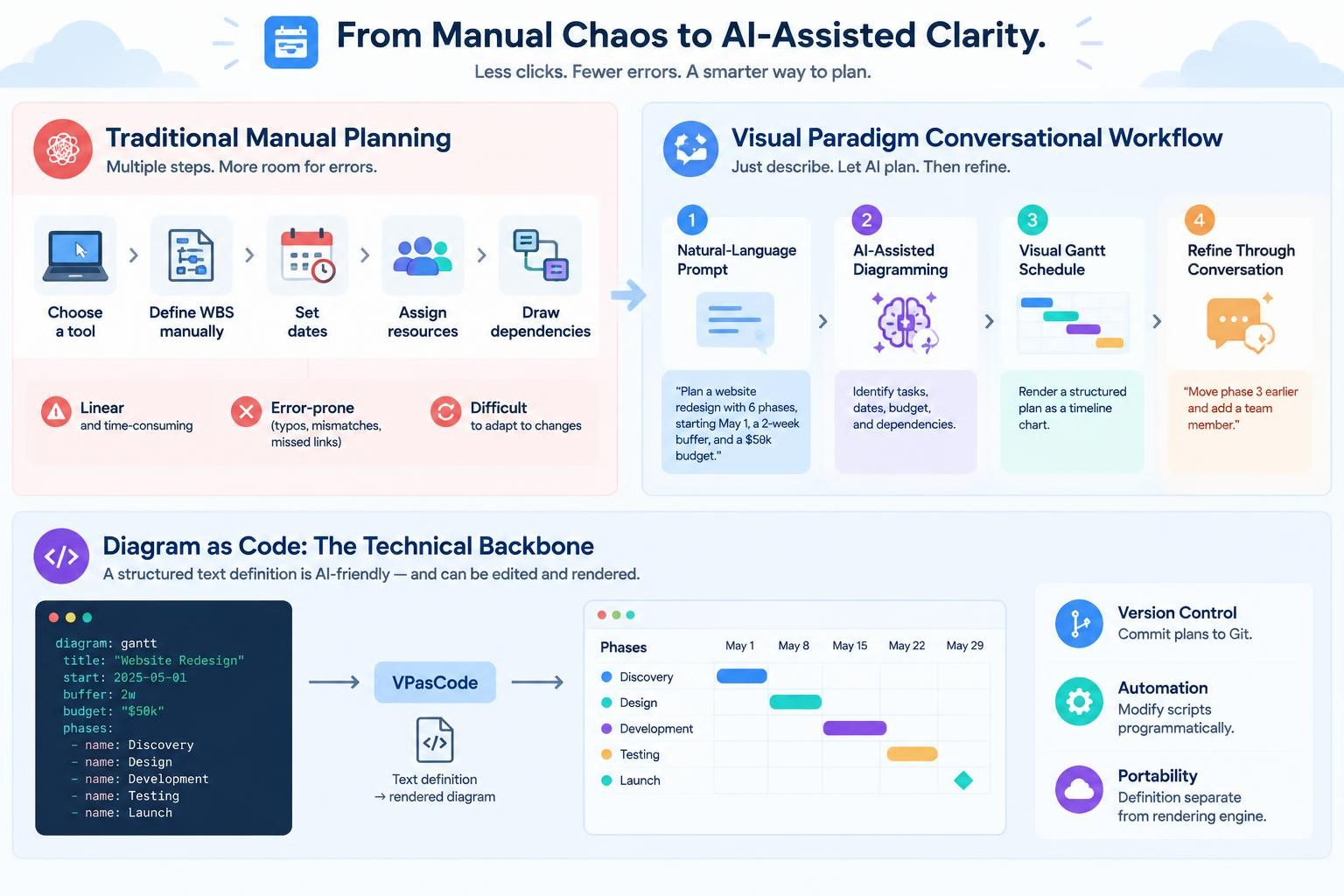
Project management has historically been a linear, often frustrating endeavor. The traditional method of creating a Gantt chart involves a rigid workflow: selecting a tool, manually defining the Work Breakdown Structure (WBS), setting dates, assigning resources, and drawing dependencies. This process is prone to human error, such as typos or mismatched links, and lacks the agility required for modern dynamic projects.
However, a paradigm shift is occurring. By leveraging the power of Large Language Models (LLMs) and the “Diagram as Code” philosophy, tools like Visual Paradigm are transforming how we plan. This tutorial explores the transition from manual data entry to an AI-driven, conversational architecture that treats project plans as programmable text.
The Conversational Workflow: Four Steps to Clarity
Visual Paradigm introduces a conversational architecture that replaces the rigid interface with a chatbot capable of interpreting user intent. Instead of clicking through menus, you engage in a dialogue to build your project schedule. The workflow follows four distinct, logical steps:
- Natural-Language Prompts: The user inputs a request using plain English. The AI understands context, not just keywords.
- Example: “Plan a website redesign project with 6 phases, starting May 1, with a 2-week buffer, and a $50k budget.”
- AI-Assisted Diagramming: The AI parses the intent to identify specific entities (tasks), attributes (dates, budget), and relationships (dependencies). It acts as a bridge between human thought and structured data.
- Visual Gantt Schedule: The system generates a structured plan, rendering the text definition into a visual chart with tasks, dates, and dependencies.
- Refine Through Conversation: The user engages in a feedback loop. Commands like “Move phase 3 earlier and add a team member” are processed dynamically to update the model without requiring manual drag-and-drop adjustments.
Diagram as Code: The Technical Backbone
At the heart of this technology is the concept of “Diagram as Code”. While the user sees a polished, visual interface, the underlying system relies on text-based modeling languages. In the Visual Paradigm ecosystem, this is handled via VPasCode.
When you ask the AI to create a chart, it is not merely “drawing” pixels on a canvas. It is generating a script—a structured definition of the project. This approach makes the diagram “AI-friendly” because LLMs are fundamentally text processors. They understand syntax and structure far better than they understand canvas coordinates.
From Text to Rendering
This separation of definition from rendering allows for modern software engineering practices in project management. The text definition is distinct from the visual output. For instance, a Gantt task in a code-based model looks like a structured definition of a timeline event:
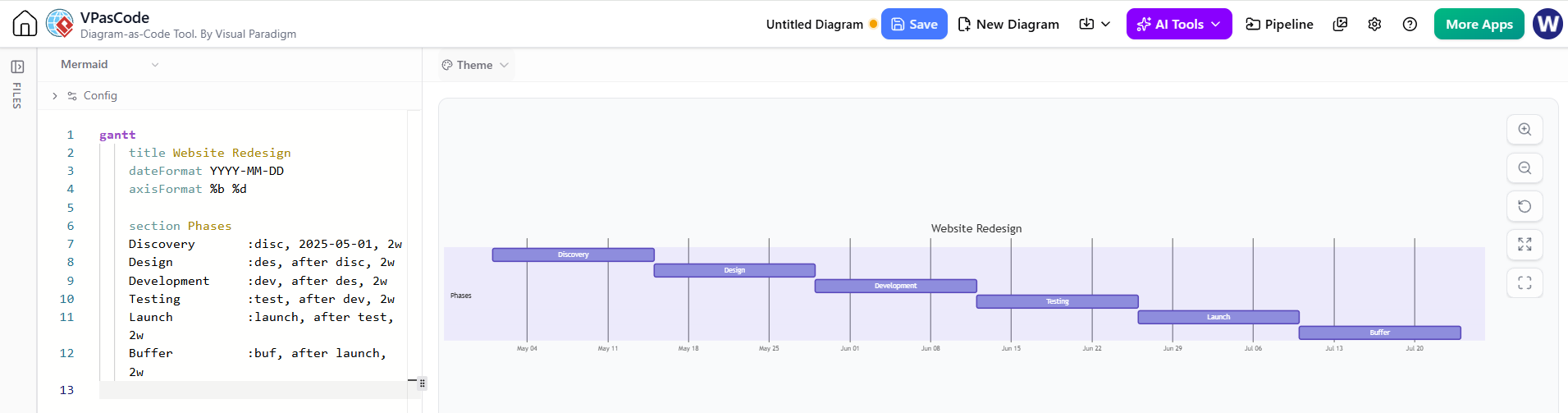
gantt
    title Website Redesign
    dateFormat YYYY-MM-DD
    axisFormat %b %d

    section Phases
    Discovery       :disc, 2025-05-01, 2w
    Design          :des, after disc, 2w
    Development     :dev, after des, 2w
    Testing         :test, after dev, 2w
    Launch          :launch, after test, 2w
Buffer :buf, after launch, 2wThis script can be processed by the VPasCode Tool to generate the visual Gantt chart shown in the diagram. Because the source is text, it enables:
- Version Control: You can commit your project plan to Git just like software code, tracking changes over time.
- Automation: Scripts can be modified programmatically, allowing for batch updates or integration with CI/CD pipelines.
- Portability: The definition is engine-agnostic, ensuring that the project plan is not tied to a specific rendering interface.
PlantUML and Standard Modeling
While VPasCode is the proprietary implementation for Visual Paradigm’s AI features, the underlying logic often aligns with open standards like PlantUML. PlantUML is a widely adopted text-based diagramming tool that allows users to describe UML diagrams in plain text.
In a standard PlantUML Gantt chart, the syntax follows a strict pattern of “Task Name” followed by “Start Date” and “End Date” or duration. This reinforces the “Diagram as Code” philosophy where the diagram is a byproduct of the data definition.
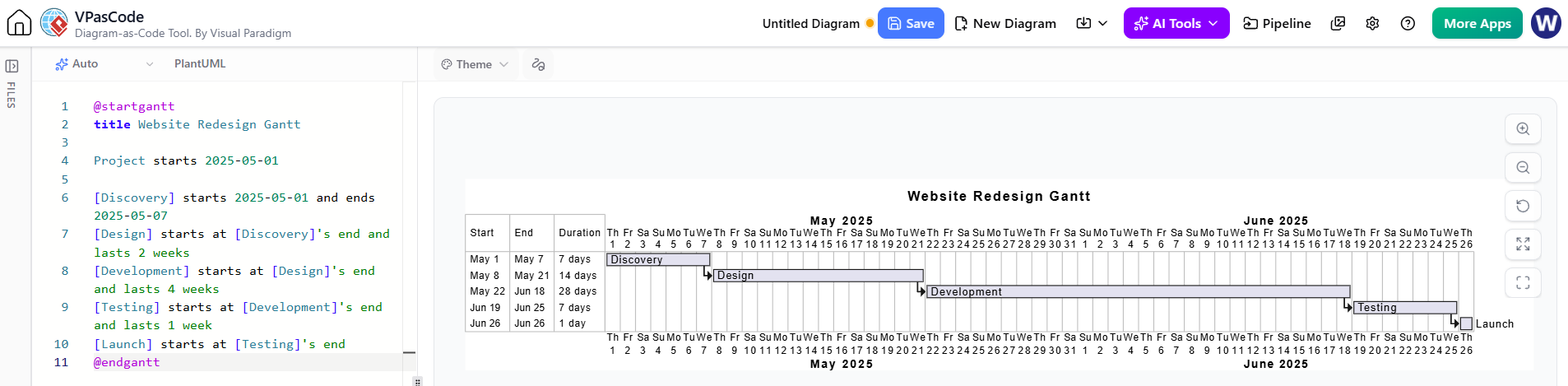
@startgantt
title Website Redesign Gantt

Project starts 2025-05-01

[Discovery] starts 2025-05-01 and ends 2025-05-07
[Design] starts at [Discovery]'s end and lasts 2 weeks
[Development] starts at [Design]'s end and lasts 4 weeks
[Testing] starts at [Development]'s end and lasts 1 week
[Launch] starts at [Testing]'s end
@endganttWhy Visual Paradigm Stands Out
The benefits of this architecture extend beyond simple convenience. By treating the project plan as a programmable object, Visual Paradigm offers a level of stability and flexibility that traditional Gantt software lacks. It bridges the gap between the creative freedom of natural language and the precision of engineering code.
Whether you are using the Visual Paradigm Gantt Chat Tool for rapid prototyping or the VPasCode Tool for deep integration, the result is a smarter, more resilient project management workflow that adapts to your needs rather than forcing you to adapt to it.