



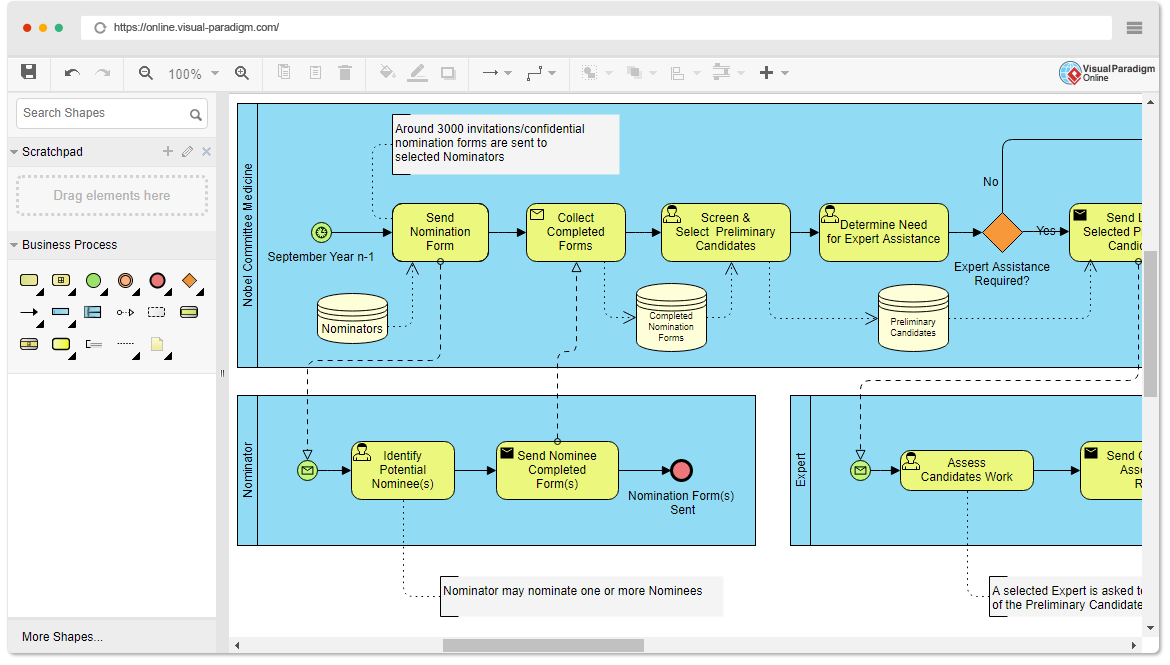
Business Process Model and Notation (BPMN) is the industry standard for visualizing complex workflows. Unlike simple flowcharts, BPMN allows for a structured representation of how processes interact between different departments, roles, or external entities. In this tutorial, we will analyze the Nobel Prize Nomination Process diagram to understand how BPMN Swimlanes (Pools and Lanes) orchestrate a multi-party workflow.
Understanding the Architecture: Pools and Lanes
The core organizational structure of a BPMN diagram is the Pool, which represents a participant in the process (such as an organization or a system). Inside a Pool, Lanes are used to categorize activities by role or responsibility. This separation ensures that it is clear who is responsible for every step in the workflow.
In the provided diagram, we see a sophisticated setup involving three distinct organizational entities:
- Nobel Committee (Medicine): The central governing body responsible for managing the entire nomination lifecycle.
- Nominator: The external or internal individuals responsible for identifying and proposing candidates.
- Expert: The specialized consultants brought in to evaluate the technical merit of the nominees.
This structure allows the diagram to show not just what happens, but who is doing it and how information flows between these distinct groups.
Step-by-Step Process Analysis
Phase 1: The Initiation (Nobel Committee)
The process begins on the left side of the Nobel Committee (Medicine) lane. A Start Event (indicated by the green circle with a clock) triggers the workflow in September Year n-1.
The sequence is as follows:
- Send Nomination Form: The Committee initiates the process by sending forms to potential Nominators. This is supported by a data store interaction with Nominators.
- Collect Completed Forms: Once the Nominators (in their own lane) complete and return their forms, the Committee collects them. This is visualized by a Message Flow (dashed line with an envelope icon) crossing from the Nominator lane back to the Committee lane.
- Screen & Select Preliminary Candidates: The Committee reviews the submissions and identifies the top candidates, storing this data in the Preliminary Candidates data store.
Phase 2: The Decision Gateway
A critical turning point occurs at the Gateway (the orange diamond) labeled Expert Assistance Required?. This is an Exclusive Gateway, meaning the process will take exactly one of the following paths based on the outcome:
- Yes Path: If the Committee determines that a candidate requires specialized evaluation, the flow moves to the Expert lane.
- No Path: If no expert assistance is needed, the flow loops back to the Send Nomination Form step to handle other candidates or move to the next phase of the process (not fully visible).
Phase 3: The Evaluation Loop (Nominator and Expert Interaction)
When the Yes path is taken, the process splits into a parallel evaluation track:
- Identify Potential Nominee(s): The Nominator identifies specific individuals. They then Send Nominee Completed Form(s) back to the Committee.
- Assess Candidates Work: Simultaneously, the Expert receives a request to evaluate the candidate’s work. The Expert performs an assessment and sends the results back to the Committee.
This parallel execution highlights the power of BPMN to model complex scenarios where multiple parties must work on the same goal at the same time.
Key Visual Elements Explained
Data Stores
The diagram utilizes cylinder icons to represent Data Stores. For example, Nominators and Preliminary Candidates are persistent storage areas. In BPMN, these represent databases, file systems, or physical filing cabinets where information is retained between process steps.
Message Flows vs. Sequence Flows
It is crucial to distinguish between the two types of lines used:
- Sequence Flows (Solid Lines): These indicate the order of activities within a single lane. They show the logical progression of a task.
- Message Flows (Dashed Lines): These represent the communication between pools or lanes. The dashed lines connecting the Nominator and Expert lanes to the Committee lane signify the transmission of physical or digital documents (Forms).
Conclusion
This diagram effectively demonstrates how Visual Paradigm Online facilitates the creation of professional-grade BPMN models. By clearly separating the Nobel Committee, Nominators, and Experts into distinct swimlanes, the diagram clarifies responsibilities and the flow of information. The use of gateways and data stores adds the necessary complexity to model a realistic, multi-stage business process.