



In the realm of business process modeling and system architecture, data is the lifeblood of an organization. It represents the information needed to execute a business process or the information produced by it. While many modelers focus heavily on the flow of activities (the “doing”), a robust system architecture requires a deep understanding of the data moving through the system (the “knowing”).
When using Visual Paradigm BPMN with AI assistance to design complex systems, clarity is paramount. This tutorial explores the four fundamental types of data constructs used to visualize how information enters, moves through, and exits a business process, ensuring your models are both compliant and integration-ready.
The Foundation: Data Objects
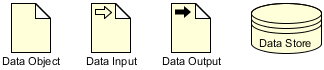
At the core of any activity in a business process is the Data Object. In Visual Paradigm, this is represented by the standard document icon.
- Definition: A Data Object represents information that is required by or produced by an activity. It is the most general form of data representation.
- Role in Modeling: It acts as a link between the business logic and the data entities. For example, an activity named “Review Application” might have a Data Object labeled “Application Form” attached to it, indicating that the form is consumed by the review process.
- Visual Representation: It typically looks like a blank page or a folded corner document.
Understanding Data Objects is the first step in defining the scope of your process. If an activity doesn’t have any Data Objects attached, it may be a purely procedural step (like a decision gate) or it might be missing critical data inputs.
Directional Flow: Inputs and Outputs
While a generic Data Object shows a relationship, it doesn’t always explicitly show the direction of the data flow relative to the process boundary. Visual Paradigm allows for more specific modeling using Data Inputs and Data Outputs.
Data Inputs
A Data Input is a specific type of Data Object that indicates data entering the process or an activity. In the diagrammatic representation, this is often visualized with a document icon accompanied by an arrow pointing into the activity or the process boundary.
- System Integration: When designing for system integration, identifying Inputs is crucial. These are the interfaces where your system must accept data from external sources (e.g., an API payload, a file upload, or a user entry).
Data Outputs
Conversely, a Data Output represents data resulting from the process. It is visualized with an arrow pointing out of the activity or process boundary.
- Compliance & Auditing: Outputs are often the data artifacts that need to be archived or reported. In a compliance context, knowing exactly which data leaves the system is as important as knowing what enters it.
By distinguishing between generic Data Objects and directional Inputs/Outputs, you create a model that explicitly maps the “flow” of information, making it easier for developers to map these to actual data pipelines.
The Backbone: Data Stores
Processes rarely happen in a vacuum; they rely on memory. This is where Data Stores come into play. A Data Store represents a place where data is kept, persisted, or retrieved.
- Definition: This can be a database (SQL, NoSQL), a file system, a cloud storage bucket, or even a physical filing cabinet.
- Visual Paradigm Usage: In your diagrams, this is often depicted as a cylinder or a specific storage icon.
- State Management: Unlike a Data Object which might exist only during the execution of an activity, a Data Store persists. It allows the system to “remember” information between process instances.
Integrating AI with Visual Paradigm
Visual Paradigm’s AI-assisted features can significantly speed up the creation of these models. Instead of manually dragging and dropping icons, you can prompt the AI to “Create a Data Flow Diagram for an Order Processing system.”
The AI can then:
- Identify the necessary Data Objects (Order ID, Customer Info).
- Define the Inputs (Order Request) and Outputs (Shipping Confirmation).
- Suggest appropriate Data Stores (Order Database, Inventory Table).
This ensures that your architectural diagrams are not just pretty pictures, but functional blueprints that align with industry standards.
Conclusion
Mastering the distinction between Data Objects, Inputs, Outputs, and Data Stores is essential for anyone tasked with system integration or process compliance. By clearly defining how data moves through your architecture, you bridge the gap between abstract business requirements and concrete technical implementation.