

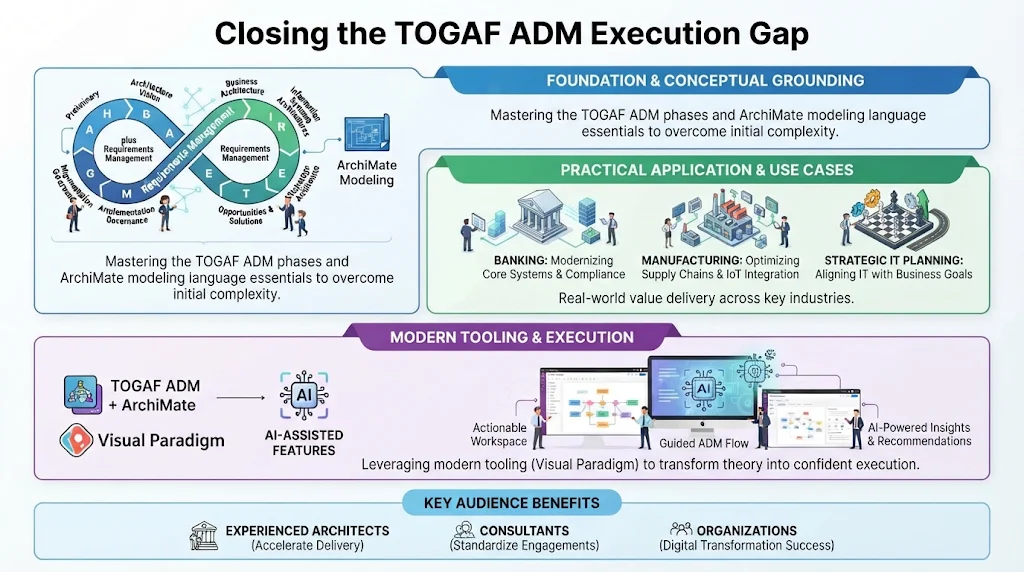
Enterprise Architecture (EA) often faces a paradox: the frameworks designed to bring clarity to complex organizations are themselves notoriously difficult to adopt. The TOGAF Architecture Development Method (ADM) is the industry standard, yet many teams abandon it mid-journey, overwhelmed by the sheer volume of phases, artifacts, and governance activities. This tutorial bridges that gap. We will explore how to transform the theoretical TOGAF cycle into an actionable, navigable workspace using Visual Paradigm, specifically leveraging its Guide-Through feature, ArchiMate modeling, and modern AI-assisted capabilities.
1. The Foundation: TOGAF ADM and ArchiMate
The TOGAF ADM is an iterative, cyclic process for developing and managing the lifecycle of an enterprise architecture. It provides a step-by-step approach to create architecture that aligns with business goals. To understand the execution, we must first ground ourselves in the essential concepts.
The Core Phases
The ADM cycle guides architects from defining the scope to maintaining the architecture after implementation. The core phases include:
- Preliminary Phase: Defines the architecture capability and tailors the framework.
- Phase A (Architecture Vision): Establishes the scope, stakeholders, and high-level vision.
- Phases B, C, D (Business, Information Systems, Technology): Develop the baseline and target architectures for each domain.
- Phase E (Opportunities and Solutions): Identifies work packages and delivery vehicles.
- Phase F (Migration Planning): Creates a detailed implementation and migration plan.
- Phase G (Implementation Governance): Ensures conformance during implementation.
- Phase H (Architecture Change Management): Manages changes to the architecture.
- Requirements Management: A central, continuous process that handles requirements across all phases.
The Role of ArchiMate
While TOGAF tells you what to do, ArchiMate provides the language to describe it. ArchiMate is an open standard modeling language that maps cleanly to the ADM phases. For example:
- The Business Layer supports Phase B.
- The Application Layer supports Phase C.
- The Implementation & Migration Layer supports Phases E and F.
2. Modern Tooling: Visual Paradigm
Visual Paradigm is a modeling tool that integrates TOGAF ADM guidance directly into its interface. It transforms the abstract ADM cycle into a Visual Process Map—a navigable flowchart where each phase and activity is a clickable node.
How It Works
When you open a TOGAF ADM project, you see the ADM cycle. The workflow is designed to reduce cognitive load:
- Double-click a phase (e.g., Preliminary) to reveal the specific activities and deliverables required.
- Double-click an activity to open a workspace with instructions, sample diagrams, and action buttons to create the necessary artifacts.
- Track Progress: Completed activities are marked with a checkmark, providing clear visibility into your project status.
Incremental Artifact Development
A standout feature of this ecosystem is that artifacts are reusable. A business process diagram created in Phase B automatically becomes available as a building block for gap analysis in Phase E. You do not redraw; you enrich. At the end of a phase, deliverables (like the Architecture Definition Document) can be generated with a single click.
3. AI-Assisted Features: The Game Changer
The integration of generative AI into the TOGAF Guide-Through is a recent development that addresses the steep learning curve and manual effort traditionally associated with ADM. This acts as a co-pilot, allowing you to draft, suggest, and accelerate while you refine, validate, and decide.
Why AI Assistance?
The primary bottleneck in ADM is often the creation of artifacts—drawing diagrams, drafting gap analyses, and building roadmaps. AI reduces this manual drafting time, allowing architects to focus on strategic decision-making and stakeholder engagement.
Standout Capabilities
- Natural Language to ArchiMate: You can describe a scenario (e.g., “A retail digital transformation with omnichannel fulfillment”) and the AI generates a starter ArchiMate diagram illustrating the goal, capability, and realization relationships.
- Intelligent Gap Analysis: The AI can visualize the differences between baseline and target states by comparing models and highlighting missing or changed elements.
- Automated Roadmaps and WBS: For Phase E and F, the AI assists in generating work breakdown structures, transition timelines, and migration roadmaps.
4. Practical Application: Tips and Tricks
Whether you are an experienced architect or an organization embarking on digital transformation with limited TOGAF expertise, the following tips will help you succeed.
Start with a Clear Narrative
The AI works best when you provide a concise, specific problem description. Instead of “improve business,” try “integrate the CRM with the billing system to reduce order-to-cash cycle time by 20%.” This yields more relevant ArchiMate diagrams.
Treat AI Output as a Draft
Always review and refine AI-generated artifacts. The AI provides a structural scaffold; the architect provides the contextual nuance and organizational reality.
Use the Repository for Onboarding
New team members can use the built-in instructions and samples in the Visual Process Map to learn TOGAF on the job, making it a practical training tool.
Conclusion
The TOGAF ADM is not a bureaucratic hurdle to be endured—it is a disciplined path to aligning business ambition with technological reality. By combining the structured rigor of TOGAF, the visual precision of ArchiMate, and the speed of AI assistance, Visual Paradigm offers a pragmatic path for organizations to execute enterprise architecture effectively. The key to success lies in treating the tool as a facilitator of your strategic thinking, not a replacement for it.