

Introduction
TOGAF’s Architecture Development Method (ADM) provides a rigorous, cyclical framework for developing enterprise architecture, but its complexity often creates a steep learning curve and heavy documentation burden. Visual Paradigm addresses this gap by embedding the ADM into a guided, model-driven workflow. Rather than treating TOGAF as a theoretical checklist, Visual Paradigm operationalizes each phase with built-in instructions, sample artifacts, and automated deliverable generation.
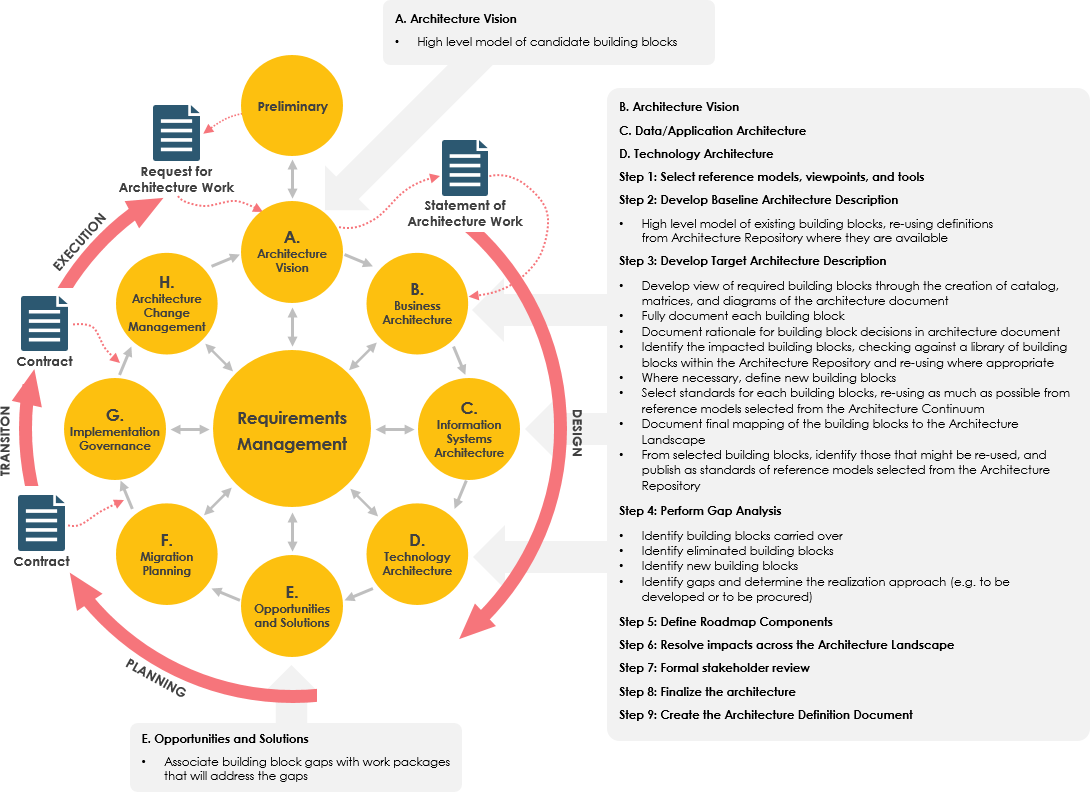
This guide examines why organizations adopt this tooling, who benefits most, what differentiates it from generic modeling tools, and practical tips for maximizing its value.
Why Use Visual Paradigm for TOGAF ADM?
Lowering the Entry Barrier
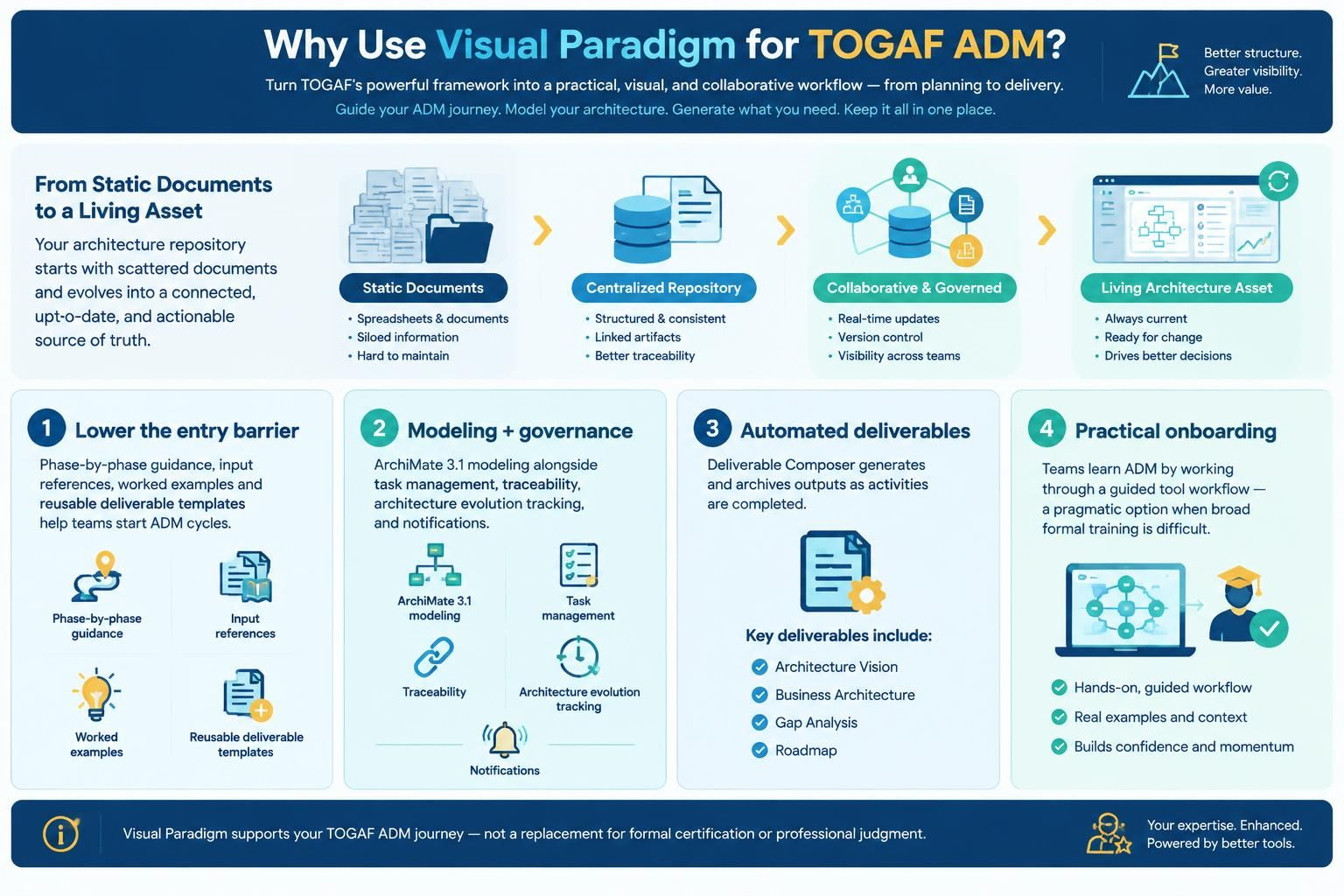
TOGAF certification and training are valuable, but applying the framework in practice requires more than conceptual knowledge. Visual Paradigm provides phase-by-phase guidance, input references, and worked examples directly within the tool. Teams with limited enterprise architecture experience can initiate ADM cycles without reinventing deliverable templates or second-guessing activity sequences.
From Modeling to Governance in One Environment
Most EA tools handle either diagramming or governance, rarely both well. Visual Paradigm combines certified ArchiMate 3.1 modeling with task management and traceability features. Architecture evolution is tracked over time, and built-in notifications support governance workflows. This means the architecture repository remains a living asset rather than a static document set.
Automated Deliverable Generation
The ADM produces a substantial volume of artifacts: Architecture Vision, Business Architecture, Gap Analysis, Roadmap, and more. Visual Paradigm’s Deliverable Composer generates and archives these outputs as activities are completed, reducing manual documentation effort and ensuring consistency across phases.
Cost-Effective Alternative to Traditional TOGAF Onboarding
Formal TOGAF training and certification are expensive. Visual Paradigm’s guided-through process offers a pragmatic middle path: teams learn ADM concepts by executing them within a structured tool environment, making the framework accessible to organizations that cannot send entire teams to certification programs.
Who Benefits Most?
| Role | Primary Benefit |
|---|---|
| Enterprise Architects | Reduced administrative overhead; focus shifts from template creation to architectural thinking |
| Business Analysts transitioning to EA | Guided workflows compensate for limited TOGAF experience; built-in samples demonstrate expected outputs |
| IT Project Managers | Clear linkage between architecture phases and implementation projects; Phase E/F support for migration planning |
| Cross-functional Teams (Business + IT) | Shared ArchiMate notation provides a common language; collaboration features bridge domain silos |
| Small to Mid-Sized EA Practices | Lower tooling complexity and cost compared to enterprise suites like LeanIX or Software AG; sufficient rigor without excessive ceremony |
Organizations pursuing formal TOGAF certification for individuals will still need training, but the tool reduces the gap between certification knowledge and operational competence.
Standout Features and Capabilities
ADM Process Navigator
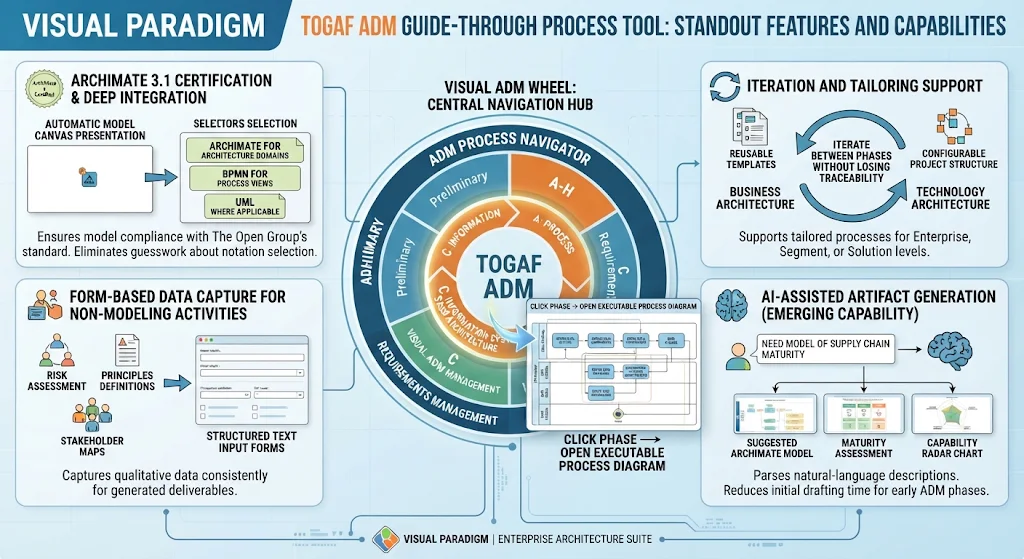
The visual ADM wheel serves as the central navigation hub. Clicking any phase opens a process diagram showing required activities and the deliverables each activity feeds into. Lanes group activities by deliverable, making the relationship between work and output explicit. This is not merely a diagram—it is an executable workflow.
ArchiMate 3.1 Certification and Deep Integration
As a certified ArchiMate 3 tool, Visual Paradigm ensures model compliance with The Open Group’s standard. The ADM navigator automatically presents the appropriate modeling canvas for each activity—ArchiMate for architecture domains, BPMN for process views, UML where applicable—eliminating guesswork about notation selection.
Iteration and Tailoring Support
TOGAF explicitly permits ADM tailoring and iteration. Visual Paradigm supports this through reusable templates and configurable project structures. Teams can iterate between phases (e.g., returning to Business Architecture after Technology Architecture reveals gaps) without losing traceability, and can adapt the process for enterprise-wide, segment, or solution-level engagements.
Form-Based Data Capture for Non-Modeling Activities
Not every ADM step requires a diagram. Risk assessments, principles definitions, and stakeholder maps often need structured text input. Visual Paradigm provides form templates for these activities, ensuring qualitative data is captured consistently and included in generated deliverables.
AI-Assisted Artifact Generation (Emerging Capability)
Recent releases incorporate AI assistance that parses natural-language problem descriptions to suggest ArchiMate models, maturity assessments, and capability radar charts. While human refinement remains essential, this feature can reduce initial drafting time significantly for early ADM phases.
Tips and Tricks for Effective Use
Start with a Dedicated Project Per ADM Cycle
Visual Paradigm enforces a one-ADM-cycle-per-project constraint. Do not attempt to reuse a project for multiple cycles. Create a new project for each iteration to maintain clean traceability and avoid model contamination.
Read Instructions Before Acting
Every activity screen includes an “Instruction” section and a “View Sample” option. Resist the urge to skip these. The samples demonstrate the expected depth and format of outputs, which is especially valuable for teams new to TOGAF. Reading them before modeling prevents rework.
Use Custom Artifacts for Context That Doesn’t Fit
The “Custom Artifacts” button within each step allows you to attach supplementary diagrams or textual notes that fall outside the standard deliverable structure. This is useful for organizational context, meeting notes, or references to external documents that inform the architecture but are not formal ADM outputs.
Leverage ArchiMate Relationships, Not Just Shapes
A common pitfall is treating ArchiMate diagrams as pictures rather than semantic models. Visual Paradigm’s engine understands relationships (serving, realization, access, etc.). When you connect elements properly, traceability and impact analysis become possible. Draw relationships deliberately, not decoratively.
Iterate Deliberately, Not Accidentally
The ADM’s circular representation invites iteration, but undisciplined looping creates confusion. Use the tool’s task completion markers to track what has been genuinely finished versus what is being revisited. When returning to a prior phase, document the trigger (e.g., “Technology Architecture revealed unaddressed data integration requirements”) in the phase’s notes.
Combine Guide-Through with Just-in-Time Usage
Visual Paradigm supports both a structured guide-through mode and a more flexible just-in-time approach. For formal ADM cycles or teams new to TOGAF, use the guide-through. For targeted architecture work (e.g., a quick gap analysis or stakeholder map), the lighter mode may suffice. Match the mode to the engagement type.
Validate Generated Deliverables Before Archiving
Automated deliverable generation is a time-saver, but it reflects what was entered. A Gap Analysis matrix with missing inputs will generate an incomplete artifact. Treat the Deliverable Composer as an assembler, not an auditor—review outputs against TOGAF’s expected content before finalizing.
Conclusion
Visual Paradigm’s TOGAF ADM tooling occupies a practical middle ground: more guided than generic modeling tools, more accessible than heavyweight EA suites. Its core value lies in converting TOGAF’s conceptual framework into an executable, model-driven workflow with automated documentation. For organizations that understand TOGAF’s value but struggle with implementation overhead, it offers a structured path from framework to functioning architecture practice. The tool does not replace architectural judgment—no tool can—but it removes enough friction to let that judgment focus on design rather than documentation.